Introduction
VMware Cloud Foundation 9 (VCF 9) provides an integrated private-cloud platform that brings together compute virtualization, software-defined networking, storage, operations, and automation. For organizations adopting Azure VMware Solution Generation 2 (AVS Gen 2), understanding how these technologies relate is important when planning infrastructure modernization and hybrid-cloud operations.
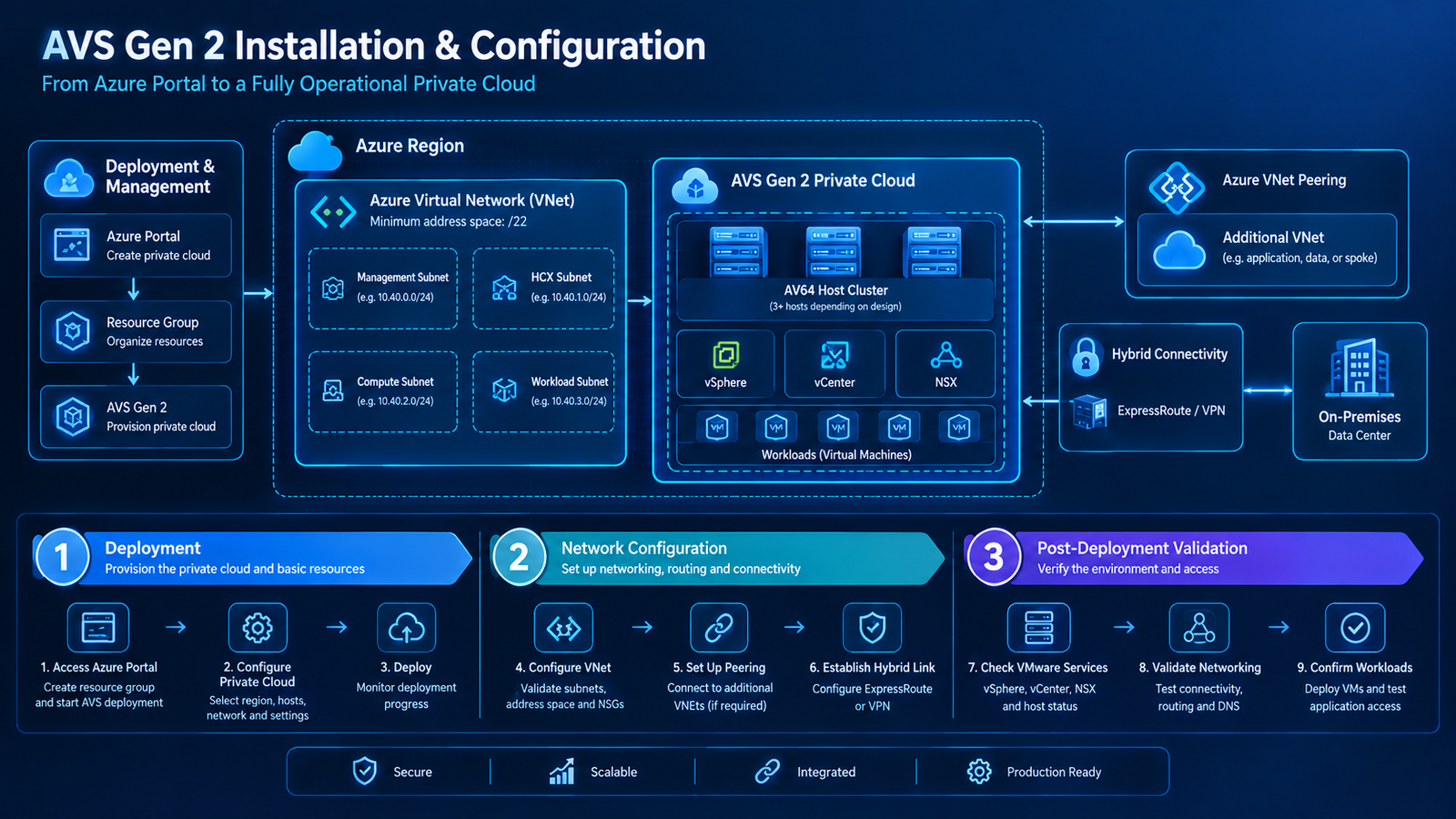
AVS Gen 2 deploys a VMware private cloud directly into an Azure Virtual Network using the AV64 host SKU. VMware Cloud Foundation 9, meanwhile, introduces streamlined deployment workflows and integrated lifecycle-management capabilities. However, the deployment approach must follow the supported capabilities of the target environment rather than assuming that every standalone VCF installation procedure applies to a managed AVS private cloud.
This guide explores the VCF 9 architecture, the preparation required for an AVS Gen 2 environment, the general deployment workflow, and the post-deployment checks needed to establish a reliable operating environment.
Understanding VMware Cloud Foundation 9

VCF 9 combines several infrastructure and management capabilities into a unified platform. Instead of treating compute, networking, storage, and operations as completely separate administrative systems, it provides an integrated approach to managing private-cloud infrastructure.
The key components include:
- VMware vSphere: Provides the virtualization foundation for running virtual machines.
- VMware vCenter Server: Centralizes the management of hosts, clusters, and virtual machines.
- VMware NSX: Provides software-defined networking and security capabilities.
- VMware Cloud Foundation Operations: Supports infrastructure monitoring, operational visibility, and lifecycle-management workflows.
- VMware Cloud Foundation Automation: Supports self-service and automation capabilities where included and configured.
The components and deployment topology depend on the supported VCF version, selected deployment model, and licensing. Not every component is automatically available in every managed-service environment.
How AVS Gen 2 Fits into the Architecture

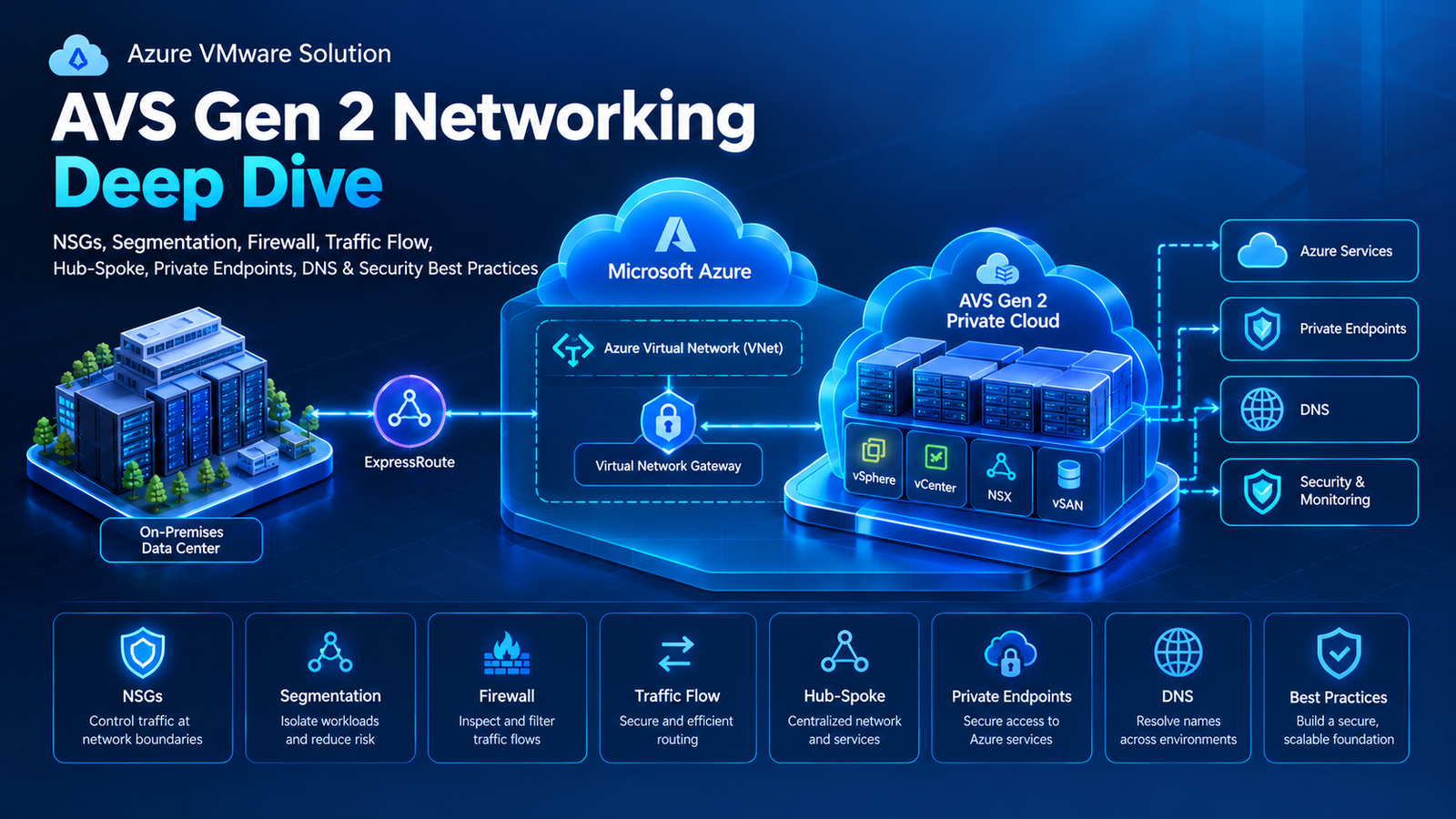
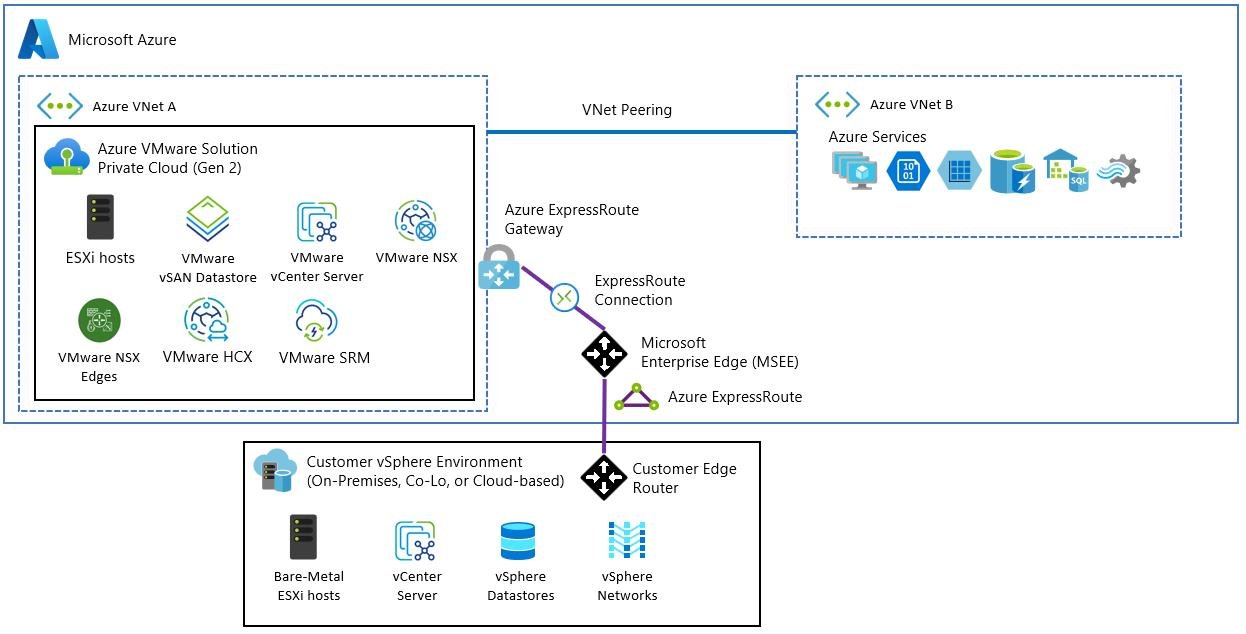
AVS Gen 2 provides the managed Azure infrastructure on which its supported VMware environment runs. Its direct VNet integration changes the networking model compared with classic AVS, which uses a Microsoft-managed ExpressRoute connection to Azure VNets.
At an architectural level, consider three separate layers:
Azure infrastructure layer: The Azure subscription, resource group, VNet, and AVS private-cloud resources provide the foundation for the deployment.
VMware platform layer: The supported VMware components run on the private-cloud infrastructure and provide compute, storage, networking, and workload management.
Operations layer: Monitoring, access management, security policies, backup, and operational procedures support ongoing service delivery.
These layers interact, but they have different administrative boundaries. Azure resource configuration does not replace VMware configuration, and VMware management tools do not replace Azure subscription governance.
Step 1: Confirm Version Compatibility and Deployment Support
Before installing or configuring VCF components, confirm the exact product versions and supported deployment model.

Review the following items:
- The AVS Gen 2 private-cloud configuration and its supported VMware components.
- The exact VCF 9 release and build referenced by the deployment documentation.
- Whether the intended VCF component or workflow is supported in the target AVS environment.
- Applicable licensing and entitlement requirements.
- Network, storage, identity, and management dependencies.
- The responsibility split between Microsoft-managed infrastructure and customer-managed configuration.
This step is particularly important because a standalone VCF deployment can involve the VCF Installer appliance and workflows that deploy or converge multiple infrastructure components. Those workflows must not be assumed to be interchangeable with the supported operating procedures for AVS Gen 2.
Step 2: Prepare the AVS Gen 2 Environment
Once the supported deployment path is confirmed, prepare the environment.

The preparation checklist should include:
- Confirm AVS Gen 2 availability and the required AV64 capacity in the target Azure region.
- Verify the subscription, resource group, and network configuration.
- Check the relevant IP address ranges for conflicts with connected networks.
- Confirm the required administrative permissions.
- Review routing, DNS, and network security requirements.
- Confirm the licensing and access arrangements for the components being deployed.
- Document the intended management and monitoring architecture.
Microsoft’s AVS Gen 2 deployment guidance specifies a minimum /22 VNet address space and requires the private cloud and VNet to be in the same resource group. These are important prerequisites for the AVS environment, not universal subnet requirements for every standalone VCF deployment.
Step 3: Follow the Supported VCF Deployment Workflow

For a supported standalone VCF 9 deployment, Broadcom documents the VCF Installer appliance as the deployment interface. It replaces the Cloud Builder appliance used in earlier VCF releases and provides a user-interface-driven workflow. The installer can obtain software binaries from the online depot or use a configured offline depot.
The general standalone workflow is:
- Obtain the supported VCF Installer appliance and required software binaries.
- Deploy and access the installer according to the applicable instructions.
- Select the appropriate deployment pathway.
- Provide the required infrastructure, networking, and management details.
- Validate the configuration before starting deployment.
- Monitor the deployment workflow and investigate any reported failures.
- Open the resulting management interface and verify the installed components.
VCF 9 supports different deployment pathways, including creating a new VCF instance, expanding an existing fleet, converging an existing vCenter environment, and importing an existing environment. The correct pathway depends on the starting infrastructure and intended outcome.
Important for AVS Gen 2: Use this standalone workflow only where the target environment and components are explicitly supported. Do not deploy a separate VCF Installer or management stack into the AVS private cloud simply because the standalone documentation describes that procedure.
Step 4: Configure Networking and Storage
After the supported infrastructure deployment is complete, validate the networking and storage configuration before onboarding workloads.

Networking: Confirm the intended workload segments, routing behavior, access controls, and connectivity to required Azure services. For AVS Gen 2, connectivity to the VNet hosting the private cloud is established during deployment, while connectivity to additional VNets requires the appropriate configuration, such as VNet peering.
Storage: Validate that the supported storage configuration is healthy and has sufficient capacity for the intended workloads. Check datastore availability, capacity consumption, and any relevant storage policies using the management tools supported by the environment.
Security: Confirm administrative access, least-privilege permissions, and the applicable Azure and VMware network controls. Validate that management interfaces are not exposed beyond the intended access boundaries.
Step 5: Validate the Deployment

A completed deployment should be followed by a structured validation process. A successful deployment status alone does not prove that every application dependency or external network connection works correctly.
Use this checklist:
| Validation area | What to verify |
|---|---|
| Infrastructure | Expected hosts and platform components are healthy. |
| Management access | Authorized administrators can access the supported management interfaces. |
| Networking | Required routes and connectivity work as designed. |
| DNS | Workloads can resolve the required internal service names. |
| Storage | Datastores are accessible and capacity is sufficient. |
| Security | Access policies and network controls match the approved design. |
| Monitoring | Required health checks, alerts, and operational visibility are available. |
| Licensing | Product licensing and entitlement requirements are satisfied. |
Where the workflow uses VCF Operations, verify the status of the relevant managed components and confirm that monitoring and lifecycle-management capabilities are functioning as expected. For AVS-managed components, use the supported Azure and VMware management interfaces applicable to that service.
Common Deployment Mistakes to Avoid
Assuming standalone and managed-service procedures are identical: VCF Installer workflows are not automatically supported inside every managed VMware environment. Verify the exact service model first.
Ignoring network dependencies: VNet integration does not automatically configure every connection to other Azure VNets or on-premises systems.
Skipping version and licensing checks: A technically compatible-looking configuration may still be unsupported or improperly licensed.
Validating only the deployment status: Test management access, DNS, routing, storage, monitoring, and workload dependencies separately.
Leaving operations until later: Monitoring, access management, backup, and lifecycle responsibilities should be assigned before the environment becomes production-critical.
Final Thoughts
VMware Cloud Foundation 9 introduces a more integrated approach to private-cloud deployment and operations. When planning VCF-related capabilities alongside AVS Gen 2, the most important first step is to establish which deployment and management workflows are supported by the target environment.
From there, teams can prepare the Azure infrastructure, follow the approved deployment process, configure networking and storage, and validate platform health before onboarding workloads.
A disciplined approach to compatibility, architecture, and post-deployment testing reduces avoidable issues and provides a clearer path toward secure, reliable hybrid-cloud operations.