Introduction
Deploying Azure VMware Solution (AVS) Generation 2 involves more than creating a private cloud in the Azure portal. A successful implementation requires preparation of the Azure subscription, host quota, virtual network, IP address space, and access permissions, followed by deployment validation and network configuration.
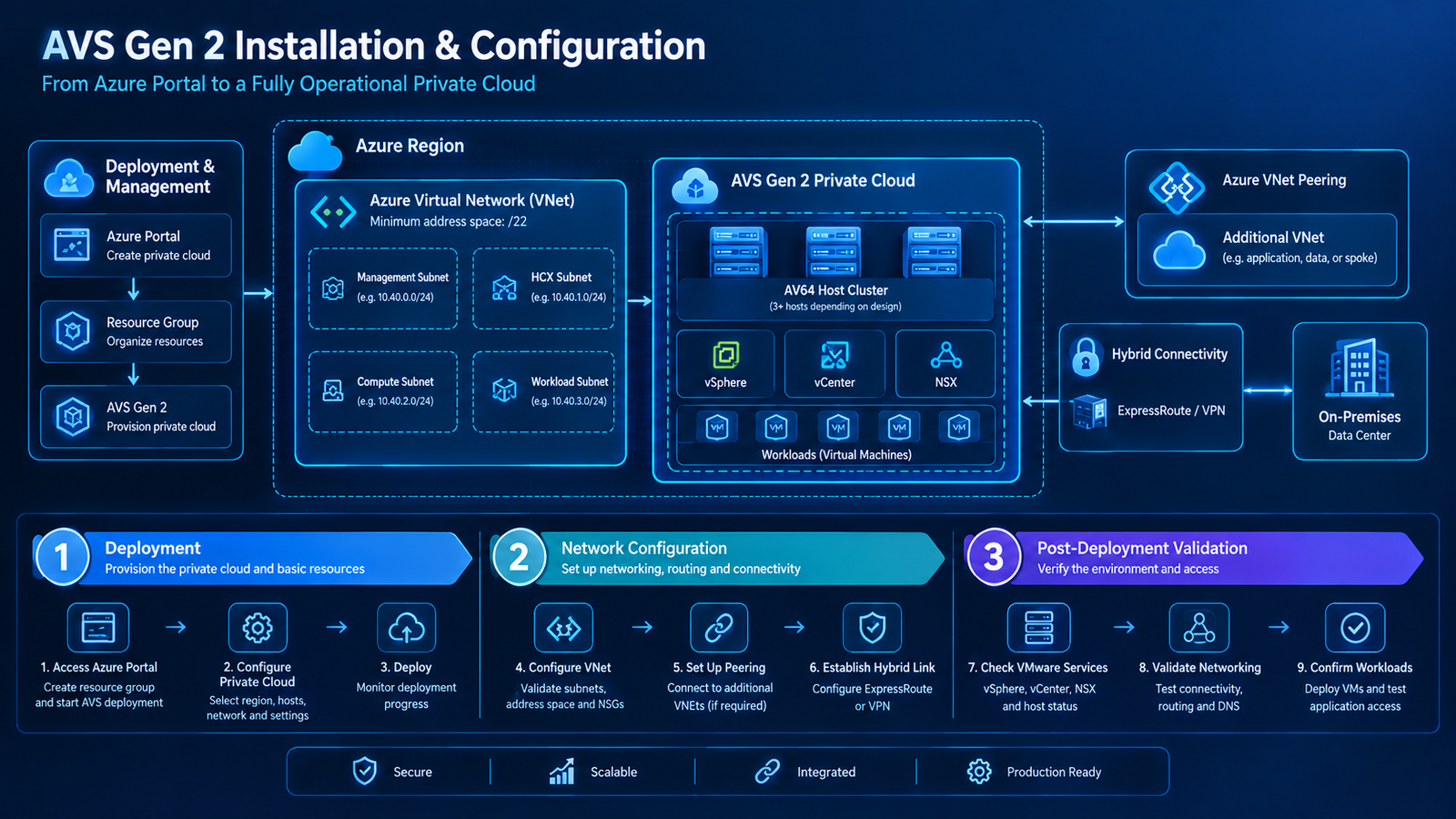
AVS Gen 2 uses the AV64 host SKU and deploys directly into an Azure Virtual Network (VNet). Unlike the classic AVS architecture, where the private cloud uses a Microsoft-managed ExpressRoute connection to Azure VNets, Gen 2 uses standard Azure networking for local VNet connectivity.
This guide walks through the deployment workflow, explains the important configuration decisions, and covers the checks needed before connecting workloads to other Azure resources or an on-premises data center.
1. Understand the Deployment Architecture

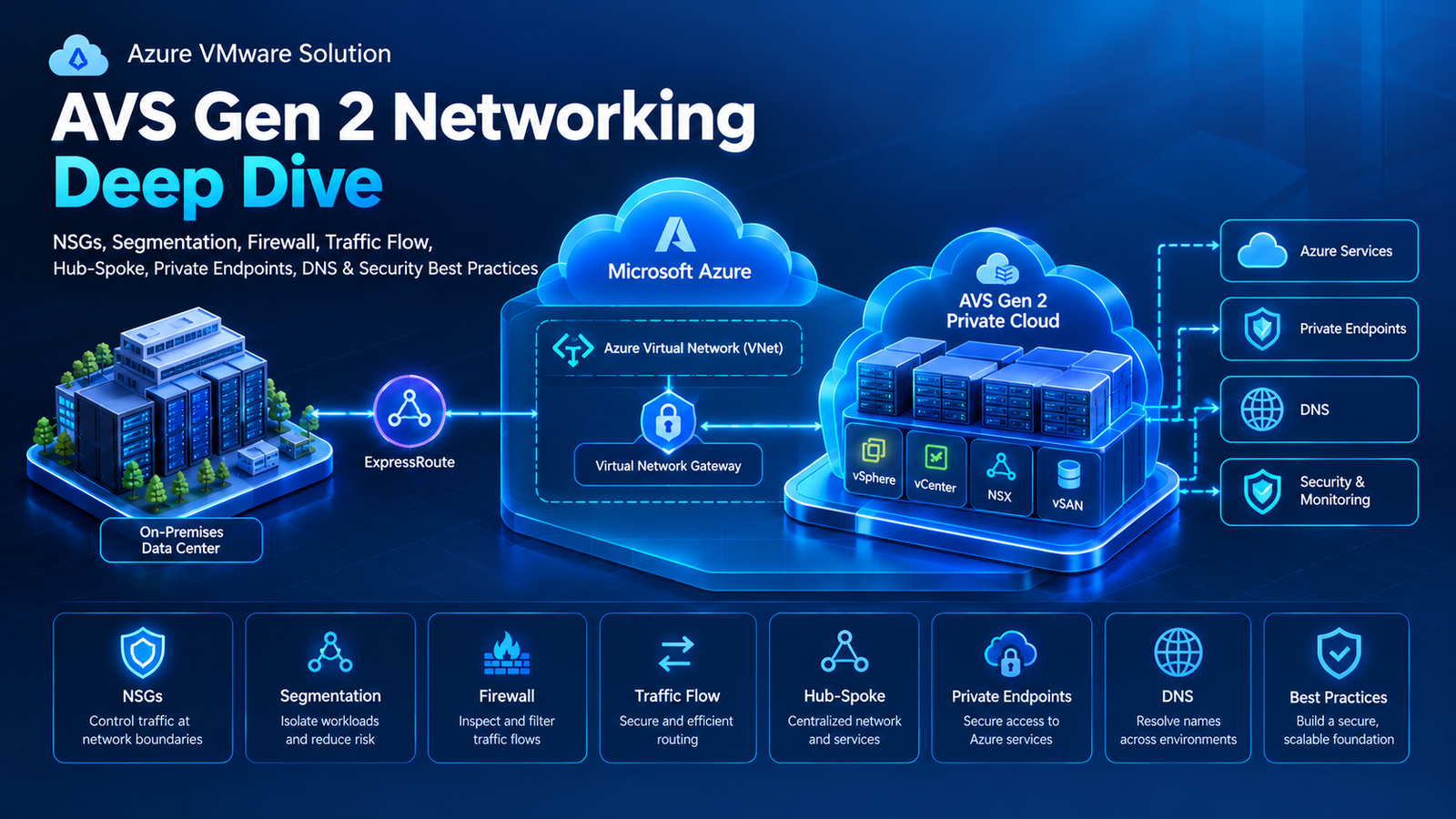
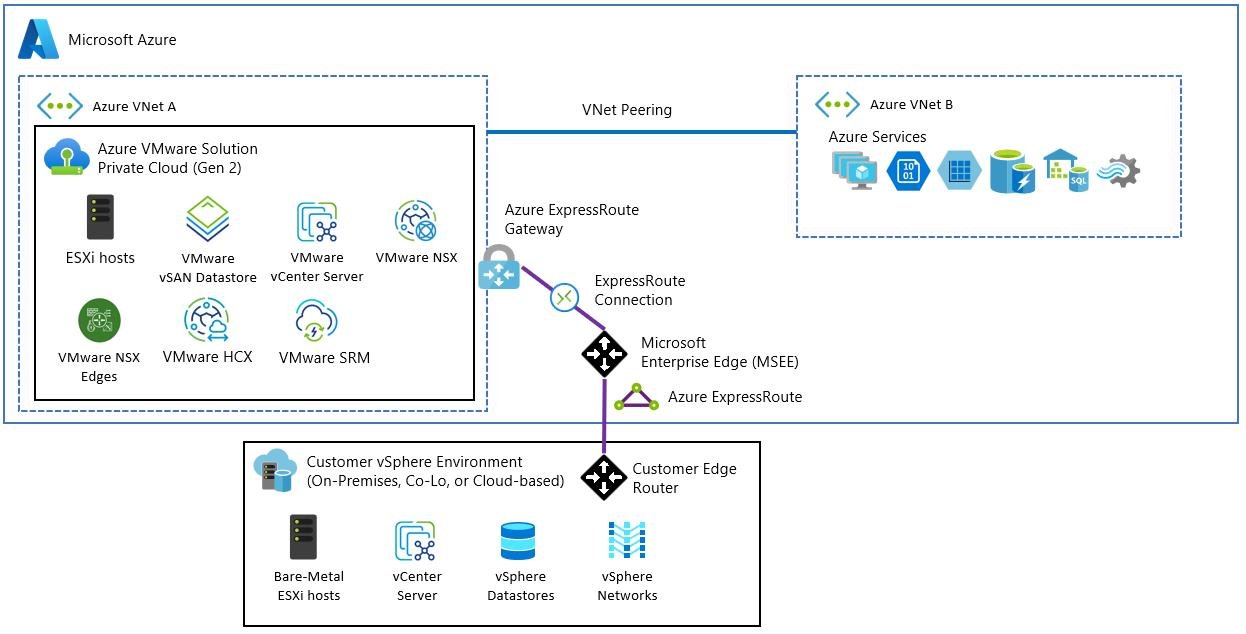
A Gen 2 deployment combines the Azure infrastructure and networking required to host a VMware private cloud. The main components include:
- Azure subscription and resource group: Provide the billing, governance, and resource-management boundaries.
- Azure Virtual Network: Hosts the private-cloud deployment and supports connectivity to Azure networking resources.
- AVS Gen 2 private cloud: Provides the VMware environment using the AV64 host SKU.
- VMware management components: vCenter Server and NSX provide management and network configuration capabilities.
- VMware workload networks: NSX segments provide network connectivity for virtual machines.
- Additional networks: Peered VNets and hybrid connections can provide access to other Azure resources and on-premises systems.
The architecture diagram is conceptual. Use Microsoft’s current Gen 2 design documentation to determine the actual subnet, routing, and connectivity configuration for your environment.
2. Prepare the Azure Environment
Before opening the deployment wizard, confirm that the required infrastructure and permissions are available.

Step 1: Select the subscription and region
Choose the Azure subscription that will own the private cloud. Confirm that AVS Gen 2 is available in the target region and that the subscription has sufficient AV64 quota.
Step 2: Register the required resource providers
Verify that Microsoft.AVS and Microsoft.BareMetal are registered in the subscription, as required by the Gen 2 deployment documentation.
Step 3: Enable the AVS Fleet RP service principal
Complete the documented service-principal enablement prerequisite. This is a specific Gen 2 deployment requirement and should be completed before starting the creation workflow.
Step 4: Verify permissions
The documented deployment process requires at least the Owner or User Access Administrator role at subscription scope. Confirm that the account performing the deployment has the required permissions.
Step 5: Check host quota
Ensure sufficient AV64 quota has been allocated in the intended region. If the required capacity is unavailable, follow the Azure quota-request process before scheduling the deployment.
3. Plan the Virtual Network and IP Address Space
Networking decisions made before deployment can prevent significant rework later.

Microsoft specifies a minimum VNet address space of /22, or four /24 ranges, for the documented Gen 2 configuration. The VNet and private cloud must be in the same resource group. The selected address space must also be appropriate for the private-cloud management network and must not overlap with address ranges already in use.
For example, 10.40.0.0/22 could be considered as a candidate private address range if it is available and suitable for the environment. It should not be copied into production without checking the existing IP inventory.
Before proceeding, review:
- Existing on-premises IP ranges.
- Other Azure VNets and peering relationships.
- The private-cloud management address block.
- Required delegated subnets and network security controls.
- DNS requirements and any existing custom DNS configuration.
- Future connectivity to other VNets and on-premises systems.
Important: Microsoft documents custom DNS on the VNet hosting the Gen 2 private cloud as unsupported when using Private DNS for that private cloud. Validate the intended DNS design against the current documentation before deployment.
4. Create the AVS Gen 2 Private Cloud

Once the prerequisites are satisfied, create the private cloud through the Azure portal.
Step 1: Open the deployment workflow
- Sign in to the Azure portal.
- Select Create a resource.
- Search for Azure VMware Solution.
- Open the service and select Create.
Step 2: Enter the deployment details
Complete the fields using the values prepared during planning.
| Field | Configuration guidance |
|---|---|
| Subscription | Select the intended Azure subscription. |
| Resource group | Select or create the resource group that will contain the private cloud and VNet. |
| Resource name | Choose a unique, descriptive name for the private cloud. |
| Region | Select a supported AVS Gen 2 region. |
| Host size | Select AV64 for Gen 2. |
| Availability zone | Configure according to supported options and workload placement requirements. |
| Number of hosts | Specify the required host count based on capacity planning and available quota. |
| Virtual Network | Select an appropriate existing VNet or create one meeting the documented requirements. |
| Private-cloud address block | Enter the planned, non-overlapping management address block. |
| DNS forward lookup | Choose the supported Private or Public option according to the deployment requirements. |
The available fields and options can vary with the current portal experience. Follow the Gen 2-specific deployment instructions rather than a classic AVS tutorial that uses a different host SKU or connectivity model.
Step 3: Review and create
Check the subscription, region, host SKU, quota, VNet, address block, and resource group before selecting Create.
Provisioning can take several hours. Microsoft currently estimates approximately five or more hours for the documented Gen 2 deployment, but actual completion time can vary. Monitor the deployment status in the Azure portal instead of assuming the private cloud is ready after a fixed interval.
5. Verify the Deployment and Access VMware Management

After provisioning completes, open the private cloud resource in the Azure portal and verify that the deployment status is Succeeded.
Next:
- Review the private-cloud overview and its available management details.
- Locate the documented access information for vCenter Server and NSX Manager.
- Connect using the provided VMware credentials and the supported access method.
- Verify that the expected hosts and management components are available.
- Confirm that the private cloud is healthy before moving on to workload configuration.
Do not assume that a successful Azure deployment automatically means every external network or application is reachable. Private-cloud provisioning and end-to-end application connectivity are separate validation tasks.
6. Configure Connectivity to Other Azure VNets
One of the main benefits of Gen 2 is that connectivity to its local VNet is established during deployment. Other Azure VNets require additional configuration, commonly through Azure Virtual Network peering.

To connect a separate VNet:
- Identify the VNet containing the target application or Azure service.
- Check that the address ranges do not conflict.
- Configure the appropriate VNet peering relationship.
- Review the relevant routing and NSG rules.
- Test connectivity from an authorized workload or management endpoint.
Regional and global VNet peering are supported for AVS Gen 2. When NSX segments, subnets, or routes change, Microsoft notes that the standard VNet peering resynchronization may be required to propagate the changes.
7. Configure Hybrid Connectivity and Internet Access
If workloads need to communicate with an on-premises data center, plan the hybrid connection separately from local VNet connectivity.
Depending on the architecture, this may involve ExpressRoute, VPN, or another supported network topology. Validate route propagation, firewall policies, DNS resolution, and return paths before moving production workloads.
For internet access, Gen 2 workloads can use supported topologies involving Azure Firewall, a third-party Network Virtual Appliance (NVA), or Virtual WAN. Internet access is not automatically enabled for all workload traffic. Microsoft’s documented Azure Firewall/NVA pattern uses a route table with a default route (0.0.0.0/0) pointing to the selected appliance, along with the appropriate AVS subnet associations and firewall rules.
8. Validate Networking, DNS, and Security

Before deploying or migrating production virtual machines, verify the following:
- IP addressing: Confirm the VMware workload network uses the intended address range.
- Routing: Check the expected routes between workload networks, Azure VNets, and on-premises networks.
- DNS: Verify that workloads can resolve the required internal and external names.
- NSGs and firewall rules: Confirm that required traffic is permitted without opening unnecessary access.
- Management access: Verify that vCenter and NSX management access follows the intended security policy.
- Application connectivity: Test actual application ports and dependencies rather than relying solely on successful ping tests.
AVS Gen 2 creates delegated management subnets and applies additional system-managed security controls. Avoid changing network policies without understanding their impact on platform management and workload connectivity.
9. Common Deployment Issues to Avoid
Insufficient quota: Resolve capacity requirements before starting the deployment.
Overlapping IP ranges: Review all connected networks before committing to an address block.
Azure Policy conflicts: Strict NSG or route-table policies can prevent required AVS networking resources from being created. Review applicable policies before deployment.
Incorrect resource placement: The private cloud and its VNet must be in the same resource group under the current Gen 2 design.
Unplanned DNS or internet routing: Decide how name resolution and outbound traffic should work before onboarding applications.
These checks help reduce avoidable delays and make the deployment easier to troubleshoot.
Final Thoughts
Deploying AVS Gen 2 successfully requires coordination between Azure infrastructure preparation, private-cloud provisioning, network configuration, and post-deployment validation.
Start by confirming permissions, resource-provider registration, AV64 quota, and VNet readiness. Then create the private cloud, verify its management components, configure connectivity to other VNets and on-premises networks, and test DNS, routing, and security policies.
Following this sequence gives teams a more reliable foundation for migrating VMware workloads and preparing the environment for production use.