Introduction
Networking is one of the most important considerations when designing a secure and scalable Azure VMware Solution (AVS) Gen 2 environment. Applications running in a private cloud may need to communicate with on-premises systems, Azure-native services, databases, storage accounts, identity platforms, and other application workloads. Each connection introduces routing, security, and operational requirements that must be considered during the design phase.
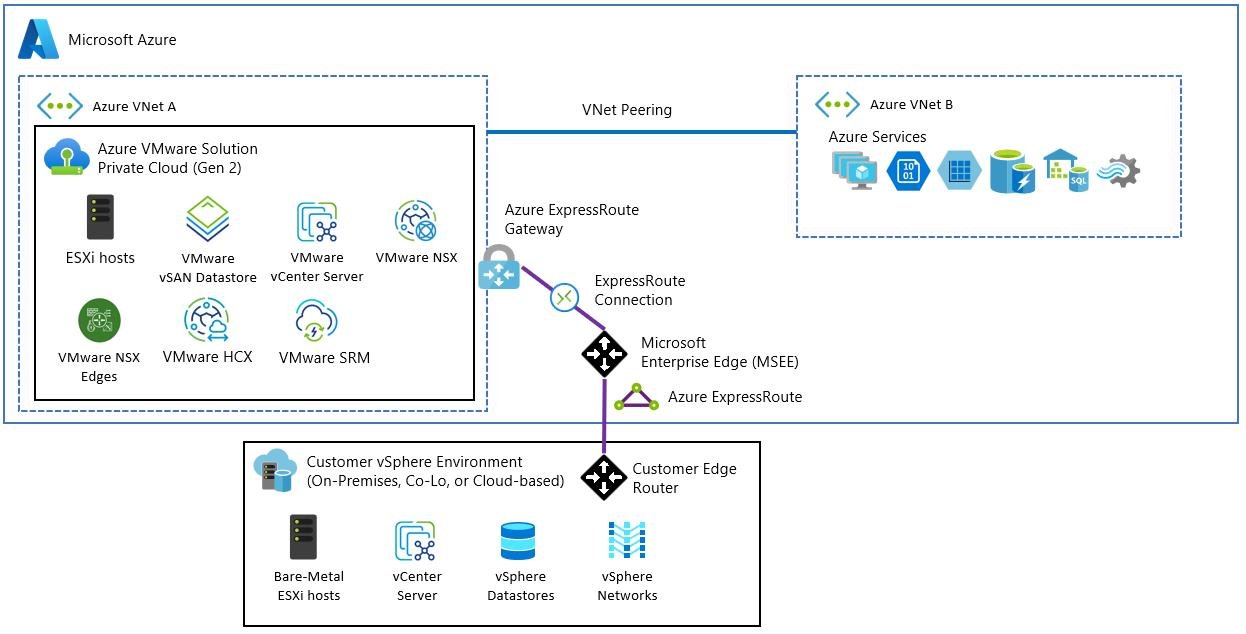
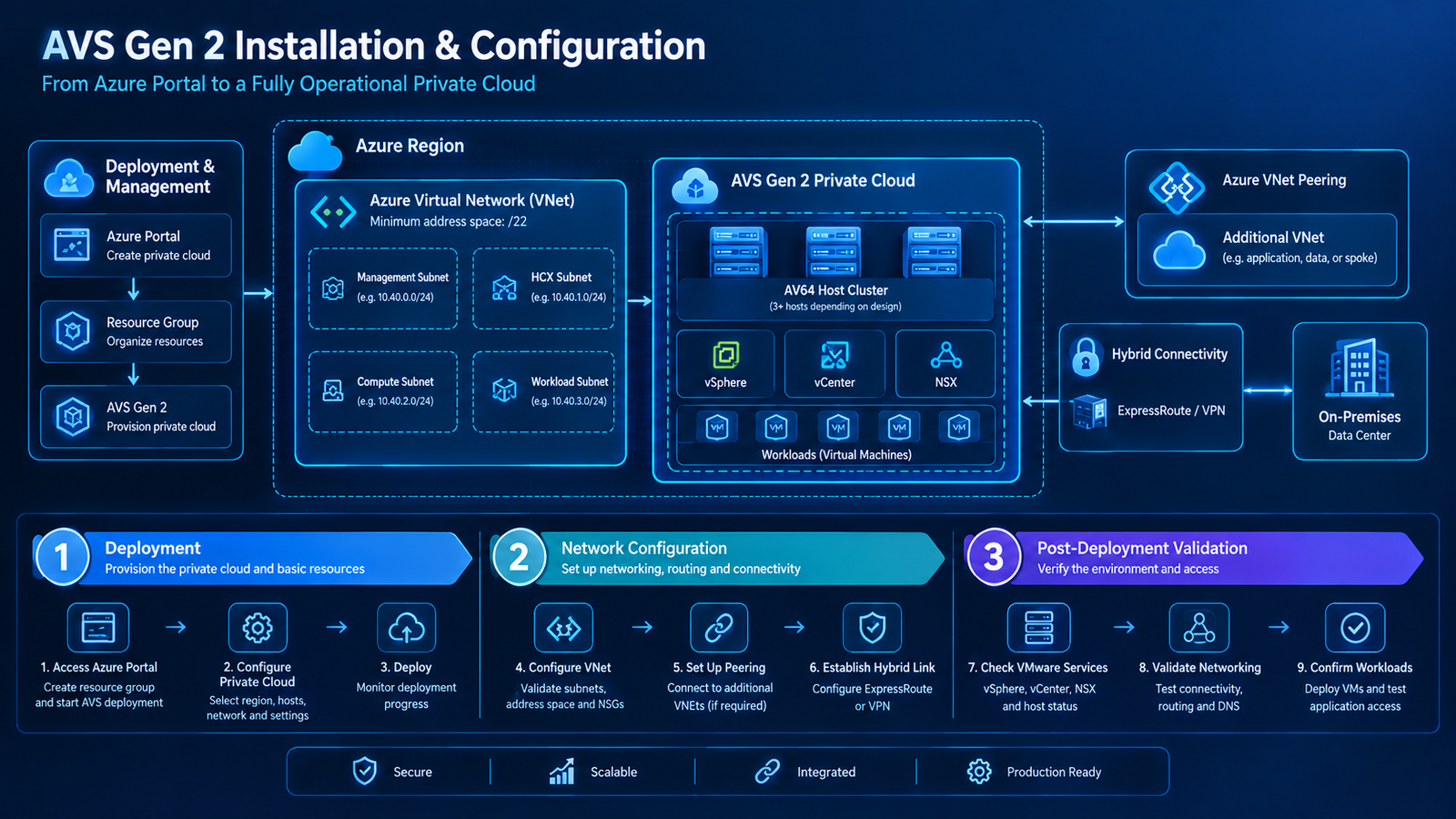
AVS Gen 2 is deployed within an Azure Virtual Network (VNet), making Azure networking components central to its connectivity architecture. At the same time, VMware networking technologies provide workload-level connectivity and segmentation within the private cloud. Understanding where these layers interact is essential to avoid routing conflicts, overly permissive access, and unexpected traffic paths.
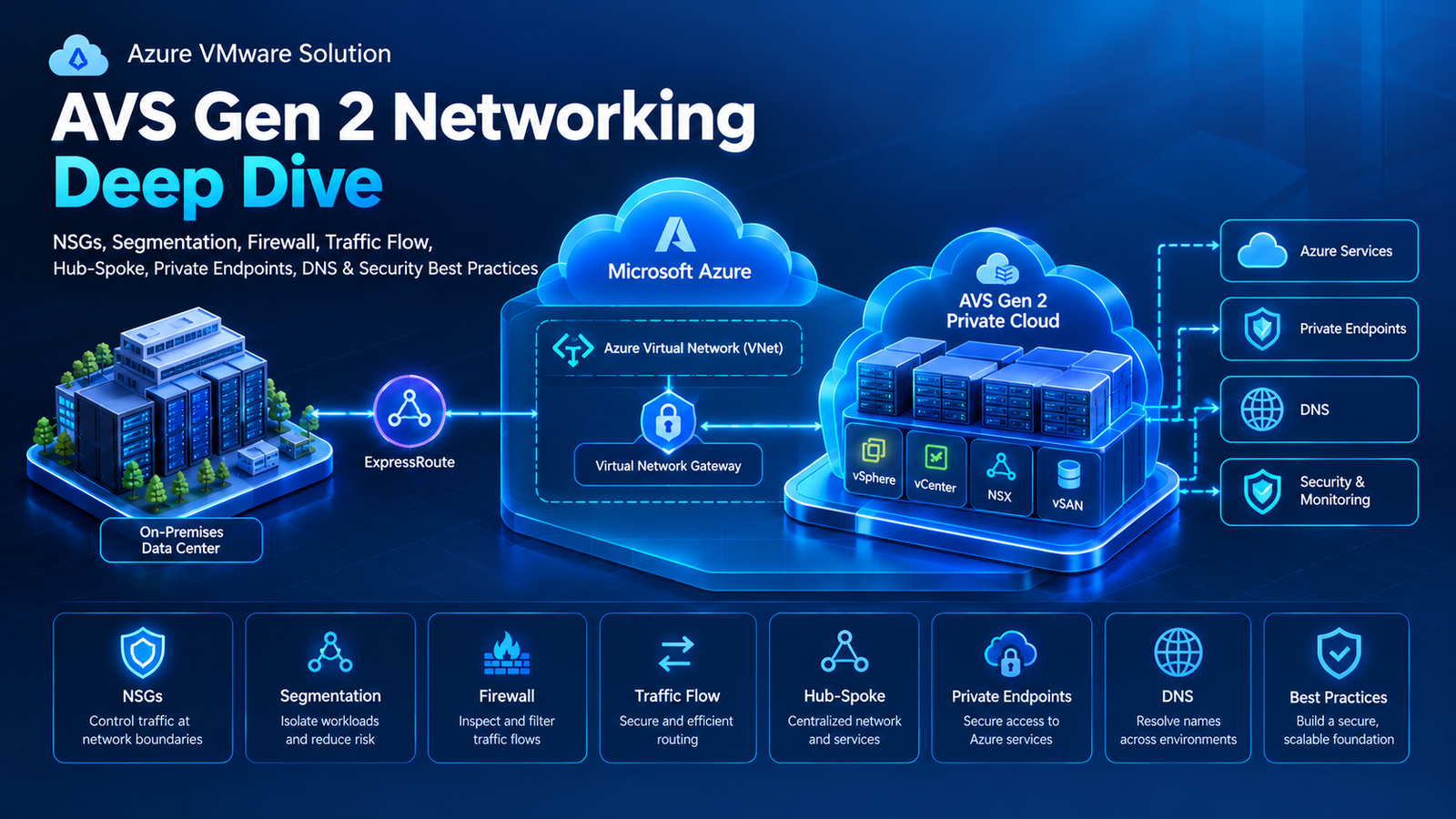
This guide explores the core networking concepts required for a production-ready AVS Gen 2 deployment, including Network Security Groups (NSGs), network segmentation, firewall architecture, traffic flow, hub-and-spoke topology, private endpoints, DNS resolution, monitoring, and security best practices.
What You Will Learn
- How Azure and VMware networking work together in AVS Gen 2.
- How NSGs control traffic at supported Azure network boundaries.
- How to segment workloads to reduce unnecessary communication.
- Where Azure Firewall and VMware NSX firewall policies fit.
- How to design traffic flow in a hub-and-spoke architecture.
- How private endpoints and DNS work together for private Azure service access.
- How to validate, monitor, and troubleshoot network security.
1. Understand the AVS Gen 2 Networking Architecture

A secure AVS Gen 2 network typically includes multiple layers, each with a specific responsibility.
Azure networking layer: Provides the VNet, subnets, route tables, VNet peering, gateways, NSGs, and connectivity to other Azure resources.
VMware networking layer: Provides private-cloud networking, workload connectivity, logical segmentation, and VMware NSX security capabilities where applicable.
Connectivity layer: Connects the private cloud to other networks through supported Azure networking patterns, including VNet connectivity and hybrid connections.
Security layer: Controls which systems can communicate through NSGs, firewalls, NSX policies, and application-level access controls.
DNS layer: Resolves application names and private service endpoints across Azure and on-premises environments.
These layers work together, but they are not interchangeable. For example, an NSG does not replace an NSX distributed firewall, and a routing rule does not automatically authorize traffic through a firewall.
Understand the AVS Gen 2 NSG Behavior
Microsoft documents that AVS Gen 2 uses system-managed NSGs in addition to customer-visible NSG configuration. These system-managed controls block inbound traffic unless access has been explicitly enabled through AVS configuration. Consequently, an Azure portal warning about exposed ports may not represent the complete effective security posture of the AVS environment.
This is an important operational detail: assess the supported AVS security configuration and effective traffic path rather than relying on a single NSG view.
2. Network Security Groups (NSGs)

Network Security Groups are Azure networking controls that filter inbound and outbound traffic for supported Azure network interfaces and subnets. Rules evaluate characteristics such as source, destination, protocol, port, and priority.
NSGs are useful for establishing basic network boundaries around Azure workloads and services. In an AVS Gen 2 design, their exact role depends on which Azure resources and network boundaries are being protected.
How NSG Rules Work
An NSG rule generally specifies:
- Source: The originating IP range, service tag, or supported source identifier.
- Destination: The target IP range, service tag, or destination identifier.
- Protocol: TCP, UDP, ICMP where supported, or any.
- Port range: The destination port or ports to permit or deny.
- Direction: Inbound or outbound.
- Priority: The order in which rules are evaluated.
- Action: Allow or deny.
Lower numerical priorities are evaluated before higher numerical priorities. A matching earlier rule can therefore affect whether a later rule is reached.
Example NSG Rule Strategy
| Scenario | Example policy |
|---|---|
| Application subnet | Allow only required application traffic |
| Administrative access | Permit approved management sources and required ports |
| Database subnet | Allow database traffic only from authorized application sources |
| Outbound traffic | Permit required dependencies and restrict unnecessary destinations |
| Unneeded inbound connections | Deny traffic that is not explicitly required, subject to the platform’s effective rules |
These are policy examples, not a universal AVS Gen 2 rule set. Always validate the supported configuration for the specific Azure resource and network boundary.
NSG Best Practices
- Avoid broad inbound rules such as allowing all ports from all sources.
- Use service tags or application-specific rules where appropriate.
- Review both inbound and outbound policies.
- Document why each rule exists.
- Remove obsolete rules after confirming they are no longer required.
- Test rule changes against application dependencies before production rollout.
Remember that NSGs are not a substitute for workload-level VMware security policies or a centralized firewall when deeper inspection is required.
3. Network Segmentation and Workload Isolation

Network segmentation divides an environment into smaller logical security zones. Rather than allowing every workload to communicate with every other workload, segmentation defines which connections are necessary.
This reduces the potential for lateral movement if an endpoint is compromised and makes it easier to apply different security requirements to different applications.
Common Segmentation Zones
A production environment might separate workloads into the following logical zones:
- Web tier: Internet-facing or user-facing application components.
- Application tier: Business logic and internal services.
- Database tier: Data services accessible only to authorized application components.
- Management tier: Administrative interfaces and operational tooling.
- Shared services: DNS, identity, monitoring, backup, and other common dependencies.
- Development and testing: Non-production systems separated from production resources.
Example only: the actual zones and IP ranges must reflect the organization’s address plan and AVS network design.
Use NSX for VMware Workload Segmentation
Within the VMware environment, NSX networking and security capabilities can provide logical network segmentation and workload-level traffic controls. Depending on the deployed design and licensing, NSX distributed firewall policies can help enforce rules closer to the workloads.
For example, a database workload might accept connections only from an approved application tier, while management traffic is permitted only from designated administrative sources.
This creates multiple security layers: Azure controls where applicable, VMware workload segmentation, and application-level authentication.
Avoid Over-Segmentation
Creating many network segments without a clear security objective can increase complexity. Start with meaningful trust boundaries, document application dependencies, and add more granular segmentation where the risk or compliance requirement justifies it.
4. Firewall Architecture: Azure Firewall and NSX

Firewalls enforce traffic policies between networks or workloads. In AVS Gen 2 architectures, Azure Firewall and VMware NSX security controls may serve different roles and can complement each other.
Azure Firewall
Azure Firewall can provide centralized network traffic filtering and inspection for supported traffic paths through an Azure VNet. It is commonly deployed in a hub VNet to manage traffic between spokes, on-premises networks, and external destinations when the routing design directs traffic through it.
It can support policies for:
- Approved outbound connectivity.
- Inter-network traffic inspection.
- Destination-based network rules.
- Application-level filtering where supported.
- Centralized logging and policy management.
Deploying Azure Firewall does not mean all traffic automatically passes through it. Route tables, gateway design, peering, and appliance forwarding must be configured to create the intended path.
VMware NSX Firewall Controls
NSX security policies can protect traffic between VMware workloads and segments, depending on the features enabled in the environment.
These controls are especially relevant when two workloads are connected to networks that are otherwise reachable but should not be allowed to communicate freely.
Use the Right Control at the Right Layer
| Security requirement | Typical control |
|---|---|
| Filter traffic at supported Azure subnet or NIC boundaries | NSG |
| Centralize inspection between routed networks | Azure Firewall or supported network virtual appliance |
| Restrict communication between VMware workloads | NSX firewall policies |
| Protect application operations and data | Application authentication and authorization |
Use layered security, but avoid duplicating rules without a clear purpose. Document which control owns each policy and where the traffic is expected to be inspected.
5. Traffic Flow and Routing Design

A network can have correct security rules and still fail if the routing design is incorrect. Every required connection needs a valid forward path, a valid return path, and security controls that permit the traffic.
North-South Traffic
North-south traffic moves between a workload environment and an external network, such as an on-premises data center or the internet.
Examples include:
- An on-premises application accessing a VMware workload.
- An AVS workload connecting to a corporate database.
- A workload reaching an approved external service.
- An administrator accessing an authorized management endpoint.
Depending on the design, these connections may use ExpressRoute, an Azure VNet gateway, Azure Firewall, or another supported network path.
East-West Traffic
East-west traffic moves between workloads or network segments.
Examples include web servers communicating with application servers, application servers connecting to databases, or workloads accessing shared services.
Use segmentation and firewall policies to ensure that only the required east-west connections are permitted. Not every workload should have unrestricted access to every other workload.
Validate the Forward and Return Paths
Consider an illustrative connection:
- Source:
10.20.1.10— on-premises application server. - Destination:
10.40.2.15— AVS workload. - Application port: TCP 443.
The source needs a route to the destination, while the destination needs a valid return route. Firewall and workload security policies must also permit the connection.
These addresses are examples only; use non-overlapping ranges appropriate to your own network.
Routing Best Practices
- Review advertised and learned routes when using BGP.
- Check route tables and user-defined routes (UDRs).
- Verify gateway transit and peering settings.
- Avoid unintended default-route propagation.
- Check for asymmetric routing through stateful firewalls.
- Validate effective routes and security policies after changes.
- Do not assume that VNet peering automatically provides transitive connectivity between all connected networks.
6. Design a Secure Hub-and-Spoke Architecture

The hub-and-spoke model is a common Azure network topology for organizations that need centralized connectivity and shared network services.
The hub VNet typically hosts shared infrastructure, while spoke VNets host application workloads and other resources. Depending on the design, the hub may contain Azure Firewall, an ExpressRoute or VPN gateway, Azure Bastion, and Azure DNS Private Resolver.
What Belongs in the Hub?
Common hub services include:
- Centralized firewall and network inspection.
- ExpressRoute or VPN connectivity.
- DNS forwarding services.
- Secure administrative access.
- Shared routing and network monitoring.
Application workloads generally belong in spoke networks rather than the hub. This separation allows platform teams to manage shared services independently from application teams.
What Belongs in the Spokes?
Spokes can separate different applications, environments, or security boundaries, such as:
- Production applications.
- Development and testing.
- Shared application dependencies.
- Data and analytics workloads.
- Additional Azure services that require controlled connectivity.
AVS Gen 2 is deployed in its associated VNet. Connecting that environment to other VNets requires the appropriate supported networking configuration; do not assume that an AVS private cloud automatically has access to every spoke.
Important: VNet Peering Is Non-Transitive
VNet peering does not automatically allow one spoke to reach another through a hub. If spoke-to-spoke communication is required, configure the appropriate routing, peering, gateway transit, or firewall architecture.
For centralized inspection, make sure the relevant traffic is actually routed through the firewall. A firewall deployed in the hub cannot inspect a flow that bypasses it.
7. Private Endpoints and Secure Access to Azure Services

Azure Private Link enables private access to supported Azure platform services through a private endpoint network interface in a VNet. The endpoint receives a private IP address from the selected subnet, allowing supported service traffic to use private connectivity instead of relying on a public endpoint for that access path.
For AVS Gen 2, private endpoints may be useful when workloads need to access supported Azure services, such as:
- Azure Storage.
- Azure Key Vault.
- Azure SQL services.
- Other supported Private Link-enabled services.
The exact service capabilities and access model depend on the selected Azure service.
Decide Where to Place Private Endpoints
A private endpoint can be placed in an application spoke when access is specific to that application. A centrally managed endpoint in the hub may be appropriate when multiple applications share the service and the architecture benefits from centralized control.
The choice should account for access requirements, DNS, routing, ownership, and security boundaries. Microsoft’s Private Link guidance discusses these design options for hub-and-spoke networks.
Private Endpoints Do Not Replace Network Security
A private endpoint provides a private access path, but it does not automatically grant application authorization or remove the need for access controls.
Review:
- Whether public network access should be restricted for the target service.
- The service’s own firewall and authorization settings.
- The source networks allowed to reach the endpoint.
- DNS resolution and private endpoint approval status.
- Monitoring and logging requirements.
A private IP address alone is not proof that the service is correctly secured.
8. DNS Architecture for AVS Gen 2 and Azure Services

DNS is a foundational part of network security and application connectivity. A workload might have a valid route to an Azure service but still fail to connect if its hostname resolves to the wrong IP address.
A hybrid environment may need to resolve:
- Internal corporate hostnames.
- Active Directory and other shared services.
- VMware workload names.
- Azure Private Link service names.
- Azure private DNS zones.
- Public service names that are required by applications.
Centralized DNS with Azure DNS Private Resolver
Azure DNS Private Resolver supports DNS forwarding between Azure and on-premises networks without requiring customers to deploy their own DNS forwarder virtual machines for that purpose.
A common centralized design places the resolver in the hub VNet. Its inbound endpoint can receive DNS queries from on-premises systems and other networks that can reach it. An outbound endpoint and forwarding rules can direct queries to on-premises DNS servers or other specified resolvers. The actual rules depend on which namespaces must be resolved.
Private DNS Zones and Private Endpoints
Private endpoints frequently rely on DNS integration so that a service hostname resolves to the endpoint’s private IP address.
For a hub-and-spoke architecture, link the relevant private DNS zone to the VNets that need to resolve its records, or use an appropriate centralized DNS forwarding design. A private endpoint can be reachable by IP address while its hostname still resolves incorrectly, so both DNS and network access must be tested.
Test DNS Resolution
On Windows:
nslookup storageaccount.blob.core.windows.netTo query a specific DNS server:
nslookup storageaccount.blob.core.windows.net 10.10.0.4On Linux:
dig storageaccount.blob.core.windows.netReplace the example service name and resolver address with the values for your environment. Confirm that the result matches the intended access path.
For private endpoint access, verify that the expected private IP is returned from the relevant clients. Also test name resolution from both Azure and on-premises environments when both need access.
9. Network Monitoring, Logging, and Troubleshooting

A secure architecture needs continuous monitoring. Network routes, workload dependencies, firewall rules, and DNS records can change over time, so initial deployment validation is not enough.
What Should You Monitor?
Depending on the services deployed, useful monitoring targets include:
- ExpressRoute circuit and gateway health.
- BGP peer state and route changes.
- Firewall allow and deny logs.
- NSG flow or traffic diagnostics where supported.
- DNS query failures and resolver availability.
- Workload connectivity and application response times.
- Bandwidth utilization, packet loss, and latency.
- Changes to route tables, peering, and security policies.
Use Azure Monitor, relevant diagnostic settings, and the logging features of deployed network and VMware components. Confirm that required logs are enabled, retained for the appropriate period, and accessible to the responsible operations team.
Common Networking Problems
| Symptom | What to investigate |
|---|---|
| Workload cannot reach an Azure service | Route, private endpoint status, DNS, service access policy |
| IP connectivity works but hostname fails | DNS records, forwarding rules, zone links |
| One application tier cannot reach another | Segmentation policy, NSG, NSX firewall, route |
| Traffic bypasses the central firewall | Effective routes, UDRs, peering, forwarding |
| Some connections fail intermittently | Route changes, firewall state, capacity, packet loss |
| Unexpected traffic is permitted | Rule priorities, broad allow rules, effective policies |
| Portal warns about exposed ports | Customer-visible NSGs and AVS Gen 2 system-managed controls |
A Layered Troubleshooting Sequence
- Verify that the source and destination are using the expected IP addresses.
- Confirm DNS resolution if the application uses a hostname.
- Check the available route and the return path.
- Review NSGs and relevant firewall policies.
- Inspect NSX workload security policies where applicable.
- Check firewall, DNS, and application logs.
- Repeat the test from the actual source host.
This method helps isolate whether the issue is caused by name resolution, routing, security enforcement, or the application itself.
10. AVS Gen 2 Network Security Best Practices

A production-ready network should follow a defense-in-depth approach. No single NSG, firewall, or private endpoint can address every security risk.
Apply Least-Privilege Access
Permit only the connections required for each workload. Avoid broad inbound access and unrestricted communication between network segments.
Administrative access should be restricted to authorized users and approved management paths.
Separate Management and Workload Traffic
Keep management interfaces and administrative services separate from ordinary application traffic wherever the supported architecture allows it. Restrict management access to trusted sources and monitor administrative connections.
Use Multiple Security Layers
Combine appropriate Azure networking controls with VMware workload segmentation and application-level authorization. Assign each layer a clear responsibility and avoid relying on a single control for complete protection.
Restrict Unnecessary Public Exposure
Use private connectivity options when they meet the service’s requirements. Where public access is needed, apply the relevant service firewall, authentication, and monitoring controls.
Validate Changes Before Production
Test routing, DNS, firewall, and segmentation changes in a controlled environment where possible. Document the expected traffic flows and verify that the changes do not disrupt essential application dependencies.
Maintain an Accurate Network Inventory
Keep network diagrams, IP ranges, DNS zones, route tables, firewall policies, and application dependencies up to date. An accurate inventory makes security reviews and incident response substantially easier.
11. Production Readiness Checklist
Use this checklist before moving critical workloads into production.
Network readiness review
0/12 completeAVS Gen 2 VNet and workload network design is documentedIP address ranges are planned and do not overlapRequired NSG and NSX policies have been reviewedManagement and workload access are appropriately separatedAzure Firewall or another required inspection path is correctly routedHub-and-spoke peering and routing have been validatedPrivate endpoints and service access policies are configuredPrivate DNS zones and forwarding rules resolve correctlyForward and return traffic paths have been testedNetwork and security logs are enabled and monitoredHigh availability and recovery requirements have been reviewedNetwork changes and troubleshooting procedures are documented
This checklist is a planning aid, not a substitute for an architecture review or a formal security assessment.
Conclusion
Building a secure AVS Gen 2 environment requires more than connecting a private cloud to an Azure network. NSGs, workload segmentation, firewall policies, routing, hub-and-spoke design, private endpoints, and DNS must work together as a coherent architecture.
NSGs provide traffic filtering at supported Azure network boundaries, while VMware networking controls can enforce workload-level policies. Azure Firewall can provide centralized inspection when traffic is routed through it, and private endpoints can offer private access to supported Azure services. DNS and routing must be configured correctly for these controls to deliver the intended result.
The most effective approach is to design around application dependencies, apply least-privilege access, validate the full traffic path, and continuously monitor the environment.
The key takeaway: secure networking is not a single configuration. It is a combination of deliberate architecture, layered controls, reliable name resolution, validated routing, and ongoing operational discipline.
Official Microsoft References
- AVS Gen 2 private-cloud network design considerations — AVS Gen 2 networking and NSG behavior.
- Connectivity to an Azure Virtual Network — Connecting AVS Gen 2 to Azure VNets.
- Hub-and-spoke network topology — Hub services, peering, and routing considerations.
- Azure Private Link in a hub-and-spoke network — Private endpoint placement and DNS integration.
- Azure DNS Private Resolver architecture — Centralized and distributed hybrid DNS designs. Learn
- AVS Gen 2 internet connectivity design considerations — Internet routing and firewall prerequisites.