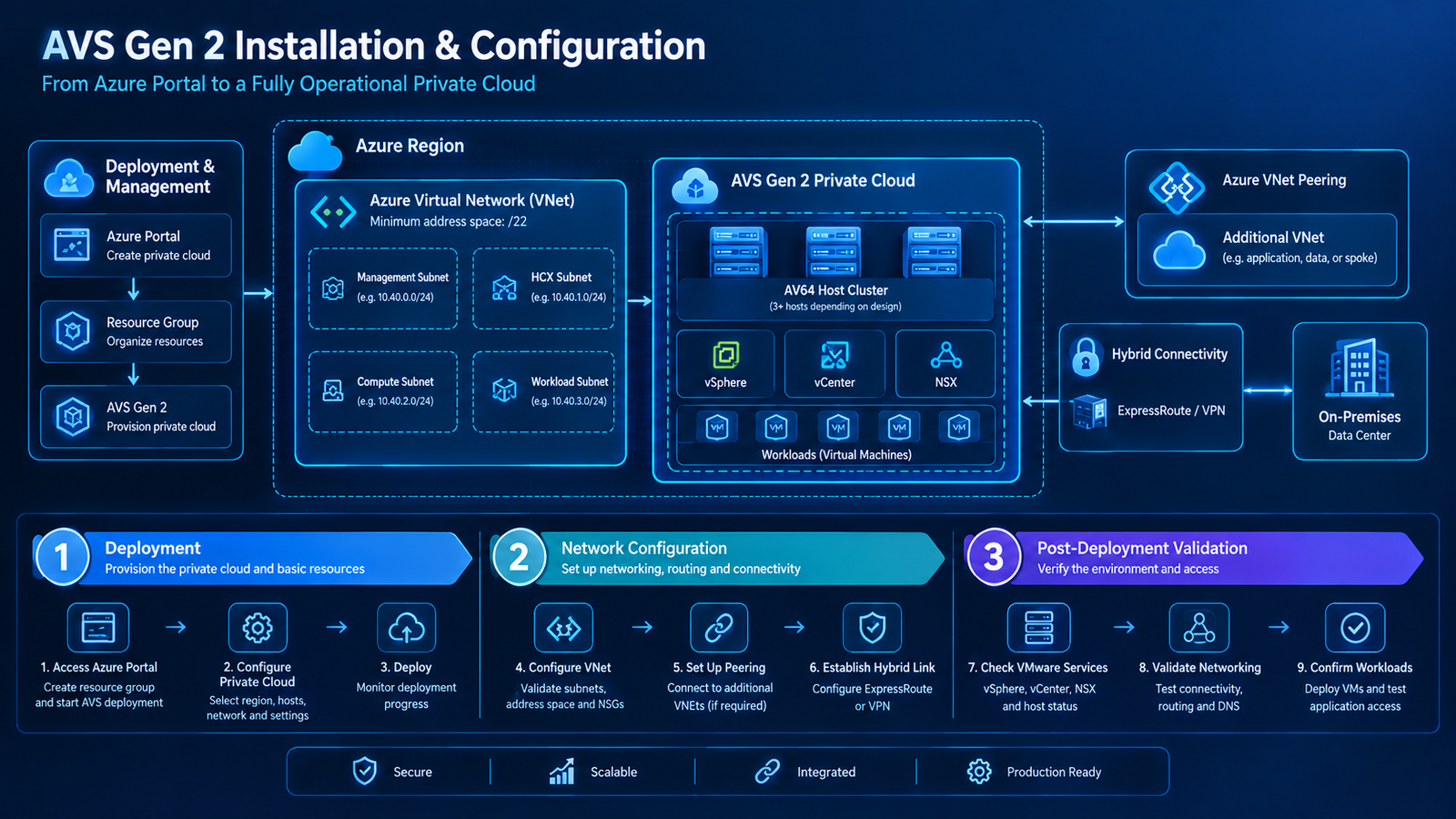
Introduction
Connecting an on-premises data center to Azure VMware Solution (AVS) Gen 2 is an important step in building a reliable hybrid-cloud environment. Organizations often need to maintain communication between existing VMware workloads, corporate applications, identity services, databases, and workloads running in Azure.
Azure ExpressRoute provides private network connectivity between an on-premises environment and Azure. When designed correctly, it supports phased workload migration, access to shared services, hybrid application dependencies, and centralized network management.
However, establishing an ExpressRoute circuit is only one part of the process. A complete solution also requires correct routing, IP address planning, DNS resolution, firewall policies, and end-to-end validation.
This guide explains how to plan and configure hybrid connectivity for AVS Gen 2, identify common networking issues, and validate communication between on-premises systems and cloud workloads.
1. Understand the AVS Gen 2 Hybrid Network Architecture

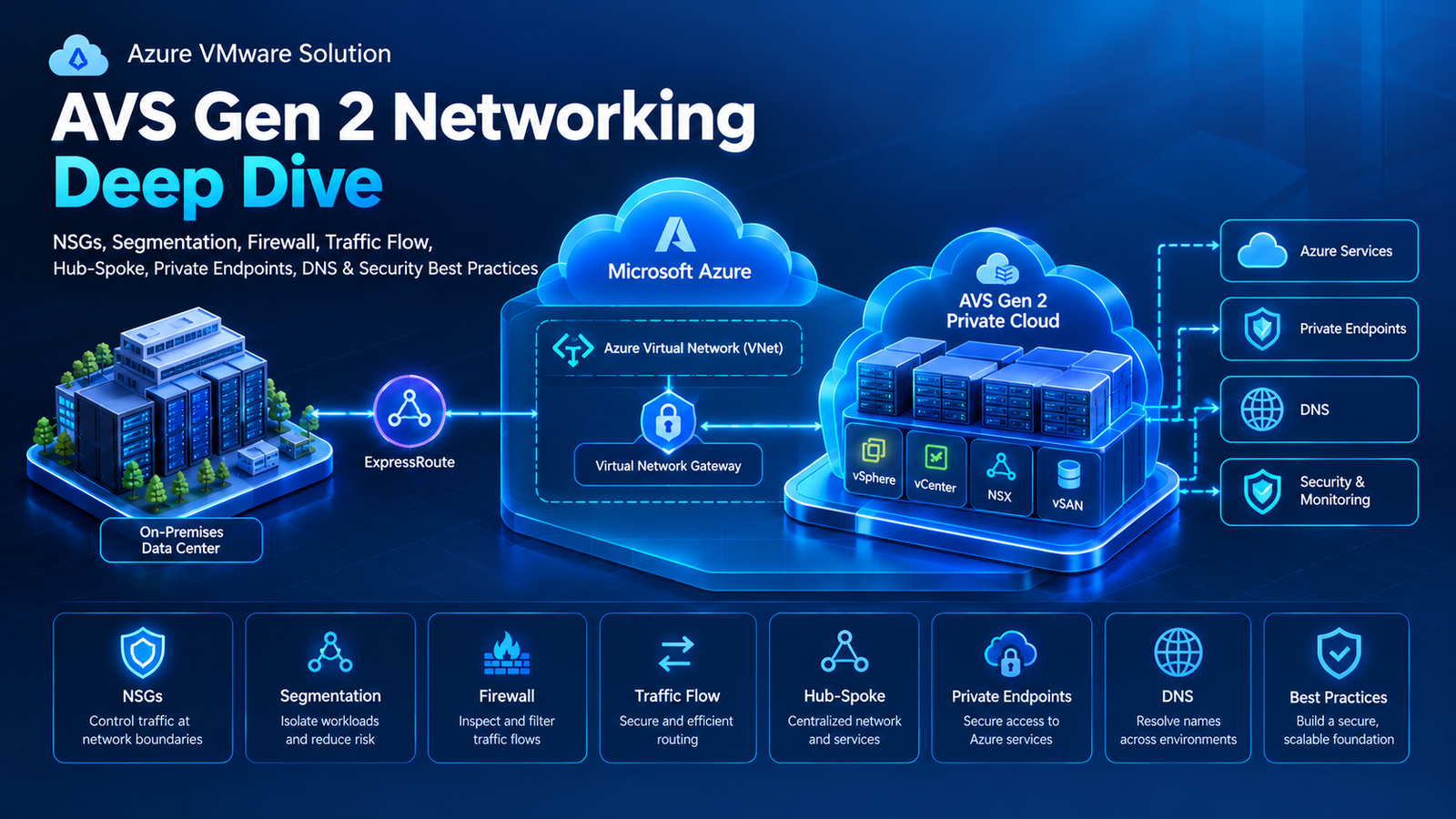
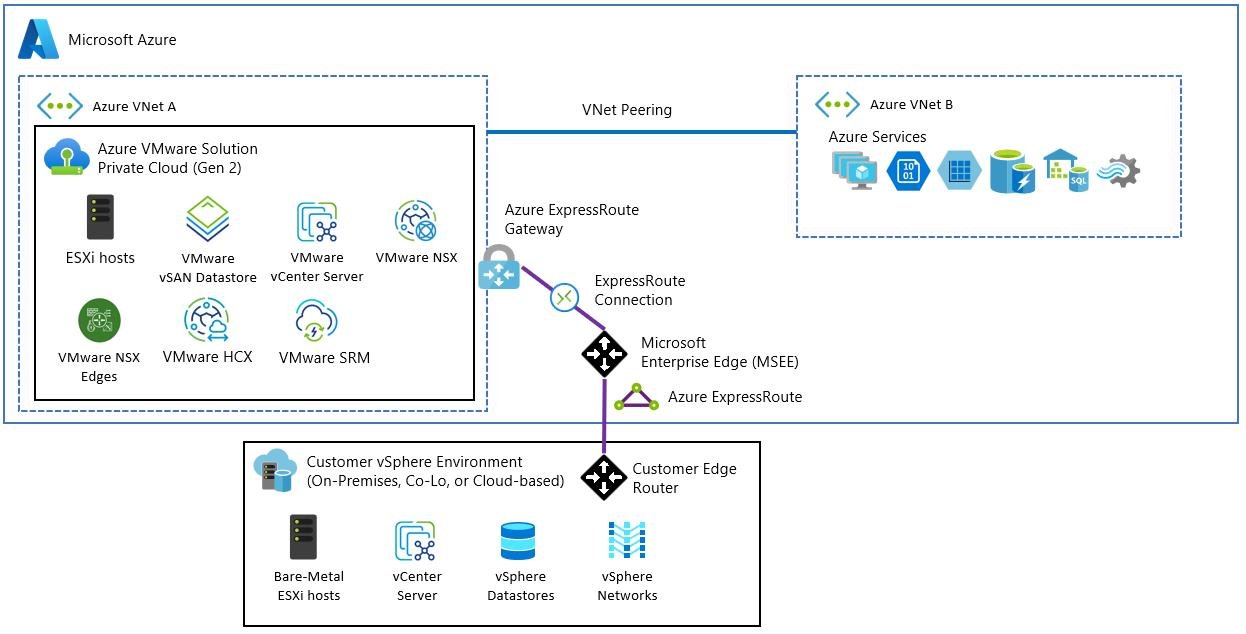
A typical hybrid architecture connects the on-premises network to Azure through an ExpressRoute circuit. An ExpressRoute virtual network gateway connects the circuit to the relevant Azure virtual network (VNet), where AVS Gen 2 is deployed.
The main components include:
- On-premises data center: Hosts existing applications, databases, Active Directory, DNS, and other corporate services.
- ExpressRoute circuit: Provides private connectivity between the customer network and Microsoft’s network.
- ExpressRoute private peering: Supports private IP route exchange between the on-premises network and Azure.
- Azure VNet gateway: Connects the ExpressRoute circuit to the relevant Azure VNet.
- AVS Gen 2 private cloud: Hosts VMware workloads within its associated Azure VNet.
- Network security controls: Govern traffic between workloads and network segments.
- DNS infrastructure: Resolves internal hostnames across the hybrid environment.
These components work together to provide a complete communication path. A healthy circuit alone does not guarantee that every workload can reach its intended destination.
2. Plan the Connectivity Architecture

Before configuring ExpressRoute, decide how AVS Gen 2 will communicate with on-premises systems and other Azure resources.
Option A: Hub-and-Spoke Architecture
In a hub-and-spoke design, the hub VNet can contain shared networking services, an ExpressRoute gateway, Azure Firewall, or network virtual appliances. Spoke VNets host application workloads and other resources.
This model can centralize network security and simplify shared connectivity, provided gateway transit, peering, route tables, and forwarding are configured appropriately.
Option B: Existing ExpressRoute Connectivity
Organizations with an existing ExpressRoute circuit should first assess whether it can support the additional workloads. Review available bandwidth, routing policies, gateway configuration, security requirements, and ownership.
Reusing existing infrastructure may reduce duplication, but the design must still provide the correct routes and security boundaries for AVS Gen 2.
Important Gen 2 Consideration
AVS Gen 2 uses a different network model from AVS Gen 1. Because Gen 2 is deployed within an Azure VNet, native Azure networking can be used for supported VNet connectivity patterns.
Do not automatically apply older Gen 1 procedures to Gen 2. Confirm the supported connection model and exact configuration steps in the current Microsoft documentation for your environment.
3. Complete the Prerequisites

Before implementing the connection, confirm the following requirements.
Verify the AVS Gen 2 Private Cloud
Confirm that the private cloud has been deployed successfully and identify its associated VNet, workload network ranges, and required management services.
Confirm ExpressRoute Availability
Verify that the circuit is provisioned and operational. If it is a new circuit, coordinate with the connectivity provider to complete provisioning and configure the required peering.
Plan IP Addressing
Document all relevant address ranges, including:
- On-premises networks.
- AVS workload networks.
- Azure VNet address spaces.
- Peered VNets.
- VPN, firewall, and network appliance interfaces.
Avoid overlapping IP ranges. Overlaps can cause route ambiguity and prevent reliable communication between environments.
Review Permissions and Ownership
Ensure that the team has the necessary Azure permissions to manage relevant networking resources. Coordinate with the on-premises network team because router, BGP, and firewall changes may require separate approval.
Define Application Dependencies
Create a list of required connections, including source, destination, protocol, port, and business purpose. This information will guide firewall configuration and connectivity testing.
4. Configure ExpressRoute Connectivity

The exact steps depend on the selected topology, but the general implementation sequence is as follows.
Step 1: Identify or Provision the ExpressRoute Circuit
Locate the existing ExpressRoute circuit in the Azure portal or provision one through a supported connectivity provider.
Check the circuit’s provisioning state and confirm that the provider-side configuration is complete.
Step 2: Configure Private Peering
Configure ExpressRoute private peering according to the circuit design. Coordinate the required IP prefixes and Border Gateway Protocol (BGP) parameters with the network provider and on-premises router team.
Verify the peering state and route exchange before moving to the next step.
Step 3: Create or Verify the ExpressRoute Gateway
Create or verify an ExpressRoute virtual network gateway in the Azure VNet that provides the required on-premises connectivity.
An ExpressRoute gateway and a VPN gateway serve different connection types. Although a Site-to-Site VPN can be an alternative or supplementary connection in a supported design, it is not a substitute for the ExpressRoute gateway in an ExpressRoute connection.
Step 4: Connect the Gateway to the Circuit
Configure the connection between the virtual network gateway and the ExpressRoute circuit. Verify the connection status and confirm that the expected network prefixes are exchanged.
Step 5: Validate the AVS Gen 2 Network Path
Confirm that AVS Gen 2, the associated VNet, and any additional VNets have the required connectivity.
VNet peering, gateway transit, route tables, and firewall rules must match the intended topology. Connectivity to one Azure resource does not automatically prove that every AVS workload network is reachable.
5. Configure Routing and BGP

Routing determines how packets travel between on-premises systems, Azure, and AVS workloads. Border Gateway Protocol (BGP) enables the exchange of network prefixes between supported routing peers.
Review Advertised and Learned Routes
Verify that:
- Required on-premises prefixes are advertised.
- AVS workload prefixes are reachable from the intended networks.
- Return routes exist for connections initiated in either direction.
- Route filters do not suppress required prefixes.
- More-specific routes do not unintentionally override the expected path.
- Default routes are propagated only where intended.
A circuit may be operational while required destination routes are missing. Therefore, circuit health and routing health must be checked separately.
Understand Hub-and-Spoke Routing
In a hub-and-spoke environment, traffic may need to pass through a centralized firewall or network virtual appliance.
Review the route tables, gateway transit settings, appliance forwarding configuration, and return path. Do not assume that VNet peering automatically provides all required transitive routing.
Validate the Return Path
Consider an example in which an on-premises server at 10.20.1.10 connects to an AVS workload at 10.40.2.15.
The destination must have a valid route back to 10.20.1.10. If the return route is missing, or the response follows an incompatible path through a stateful firewall, the application connection may fail.
These addresses are illustrative only. Use your own non-overlapping IP plan.
6. Configure Hybrid DNS Resolution

DNS allows applications to locate services by hostname rather than relying on manually configured IP addresses. Hybrid applications may need to resolve corporate domains, Active Directory records, internal application servers, and Azure private endpoints.
Choose the DNS Architecture
Depending on the environment, the design may use:
- On-premises DNS servers for corporate domains.
- Azure DNS Private Resolver for hybrid DNS forwarding.
- DNS forwarder virtual machines where a custom solution is needed.
- Azure Private DNS zones for supported Azure services.
The correct approach depends on where DNS records are hosted and which clients need to resolve them.
Configure DNS Forwarding
Identify the authoritative DNS server for each internal domain. Configure conditional forwarding or other supported forwarding rules so requests reach the appropriate resolver.
For example, an organization might host corp.example.com on-premises while also using private DNS zones for Azure services. Clients in both environments must be able to reach a resolver that can return the correct records.
Test DNS Resolution
On Windows, use:
nslookup app.corp.example.comTo query a specific DNS server:
nslookup app.corp.example.com 10.20.1.5On Linux, use:
dig app.corp.example.comReplace the sample hostname and address with values from your environment.
Confirm that hostnames resolve to the expected IP addresses, DNS servers are reachable, forwarding rules point to the correct resolvers, and private endpoint names return private IP addresses where appropriate.
7. Apply Firewall and Network Security Policies

ExpressRoute provides private connectivity, but it does not automatically permit every connection between the on-premises network, Azure resources, and AVS workloads.
Review the relevant security controls:
- On-premises firewalls: Allow approved connections to the required destination networks.
- Azure Firewall or third-party appliances: Inspect traffic where the architecture requires centralized security.
- Network security groups: Apply appropriate rules to relevant Azure resources and subnets.
- NSX firewall policies: Control traffic between VMware workload segments.
- Management access controls: Restrict administrative interfaces to authorized networks.
Create rules around documented application dependencies instead of allowing unrestricted traffic.
For each rule, identify the source, destination, protocol, port, and business purpose. Test from the actual application source because a successful connection from an administrator’s workstation does not guarantee that application servers have the same access.
8. Validate End-to-End Connectivity

Connectivity testing should cover the entire path from the source host to the destination and back.
Network and Port Tests
For Windows, test a specific TCP port with PowerShell:
Test-NetConnection 10.40.2.15 -Port 443For Linux:
nc -vz 10.40.2.15 443Use the actual destination IP and application port. A failed test may indicate a missing route, firewall restriction, inactive service, or another network problem.
A successful TCP connection confirms reachability for that port from the test host, but it does not verify every application function.
Test Application Dependencies
Validate the services your workloads require, including:
- Active Directory authentication and directory services.
- Internal APIs and application servers.
- Databases and file shares.
- DNS and time synchronization.
- Backup, monitoring, and management platforms.
- Migration tools, where applicable.
Review application logs alongside network tests to determine whether a failure occurs at the DNS, network, authentication, or application layer.
9. Troubleshoot Common Connectivity Issues

| Symptom | Possible cause | What to check |
|---|---|---|
| Circuit is not operational | Provider provisioning or peering issue | Circuit state and provider status |
| Circuit is healthy but hosts cannot communicate | Missing route or gateway configuration | BGP routes, connection status, route tables |
| One-way connectivity | Missing return route or asymmetric routing | Forward and return paths |
| IP works but hostname fails | DNS forwarding or record issue | Resolver, forwarding rules, DNS records |
| Some application ports fail | Firewall or NSX policy restriction | Security rules and application ports |
| AVS workloads are unreachable | Workload route or segment policy issue | Workload networks, advertised prefixes, NSX rules |
| Connectivity is intermittent | Capacity, routing changes, or path instability | Utilization, BGP state, router and firewall logs |
| Connection breaks after a change | Route, firewall, or DNS configuration changed | Change history and effective routes |
Troubleshoot in layers: circuit and gateway, routing, DNS, firewall, and finally application services. Avoid changing multiple configurations at once, as this makes the root cause harder to identify.
10. Plan High Availability and Performance

Hybrid connectivity should be designed for the availability requirements of the workloads it supports.
Design for Resilience
For critical applications, evaluate redundant connectivity paths, provider diversity, independent routing equipment, and recovery procedures.
Redundancy should be tested, not merely documented. Route convergence, firewall state, DNS availability, and return-path behavior all influence the recovery experience.
Monitor Bandwidth and Latency
Consider expected traffic from application transactions, migrations, backups, replication, and shared services.
Monitor circuit utilization and relevant router, gateway, firewall, and workload metrics. If performance degrades, investigate whether the issue relates to capacity, latency, packet loss, network appliances, or the application itself.
Test Failover
Where redundant connections exist, test failure scenarios during an approved maintenance window. Confirm that routes converge as expected, sessions recover according to application requirements, and DNS-dependent services remain available.
11. Hybrid Connectivity Best Practices

For a maintainable hybrid environment:
- Maintain an accurate network diagram and IP address inventory.
- Document BGP peers, advertised prefixes, route filters, and gateway connections.
- Keep firewall rules aligned with approved application dependencies.
- Document DNS zones, forwarders, and internal namespace ownership.
- Monitor circuit health, route changes, latency, packet loss, and bandwidth.
- Test application dependencies after significant network changes.
- Document and periodically test failover procedures.
- Follow current AVS Gen 2 documentation rather than assuming older Gen 1 procedures apply.
Conclusion
Reliable hybrid connectivity between an on-premises data center and AVS Gen 2 requires more than an active ExpressRoute circuit. It depends on correct routing, non-overlapping IP address ranges, functional DNS resolution, appropriate security policies, and end-to-end validation.
By planning these components together and testing each layer independently, organizations can build a dependable hybrid foundation for migrating and operating VMware workloads in Azure.
The key principle: design routing, DNS, and security as one complete connectivity solution, and validate the entire path from the source to the destination and back.