Introduction
Azure VMware Solution (AVS) enables organizations to run VMware workloads on dedicated Azure infrastructure while continuing to use familiar VMware administration and operational processes. For organizations planning a cloud migration, this can provide a path to move existing virtual machines without immediately redesigning every application.
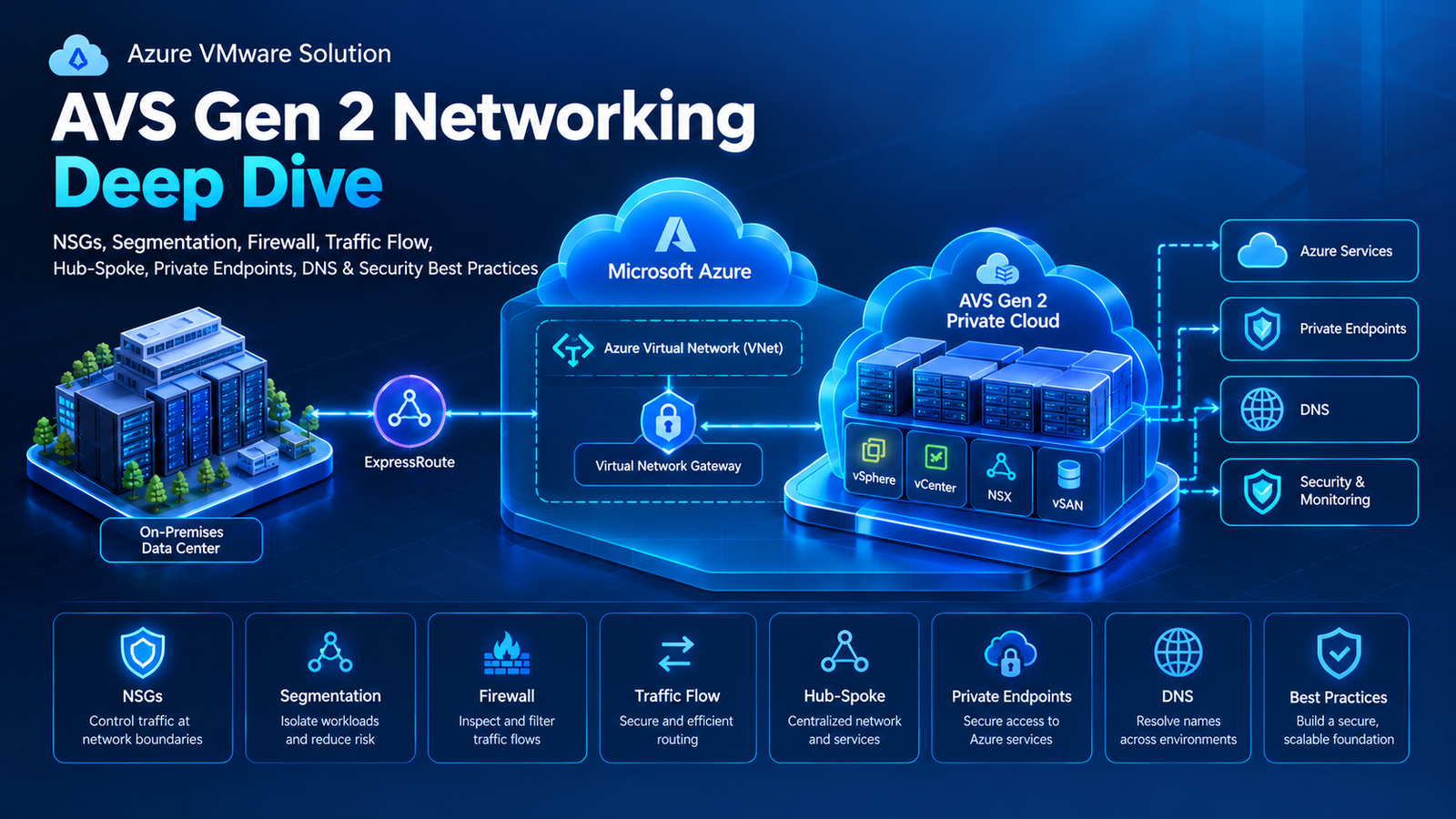
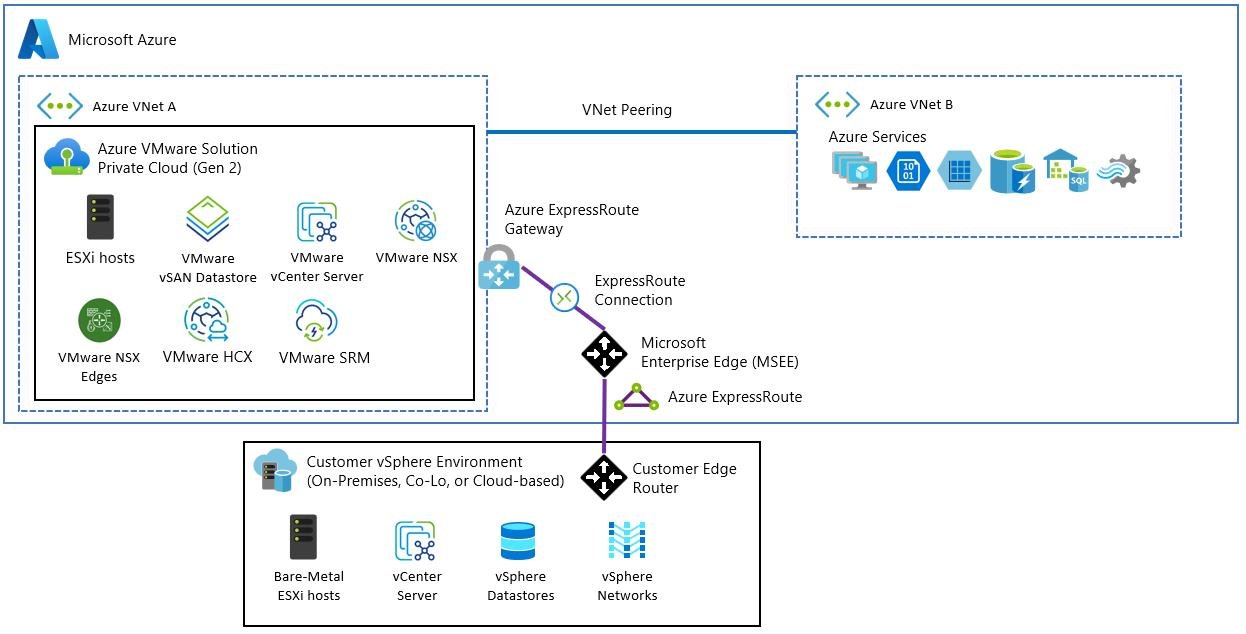
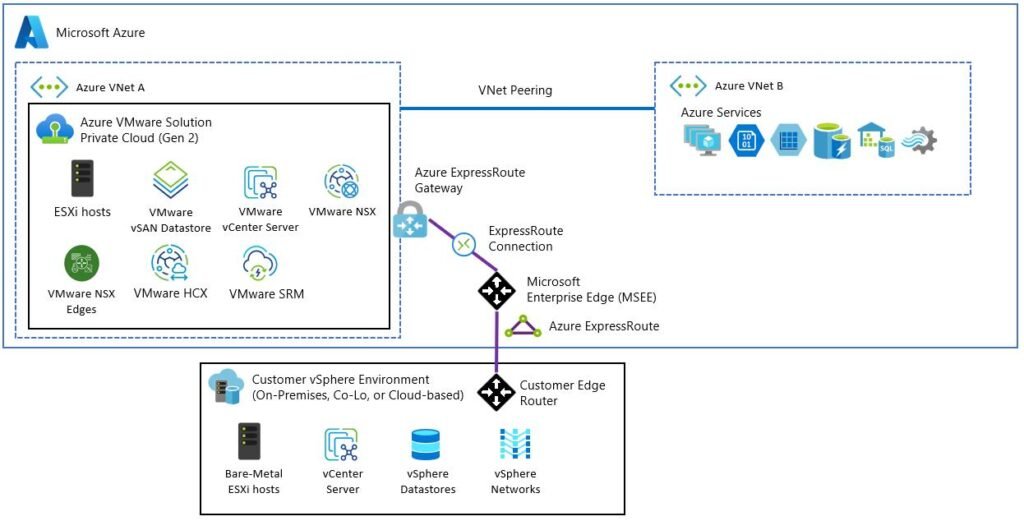
AVS Generation 2 changes an important part of that deployment model: its network architecture. Rather than using the classic AVS model’s Microsoft-managed ExpressRoute connection to Azure virtual networks, Gen 2 deploys directly within an Azure Virtual Network (VNet). This brings the environment closer to standard Azure networking, but it also makes network planning, route management, resource placement, and deployment prerequisites particularly important.
This guide explains the architectural differences, VMware host planning, quota requirements, network address planning, Azure permissions, deployment limitations, and validation steps to consider before provisioning a private cloud.
What Is Azure VMware Solution Gen 2?
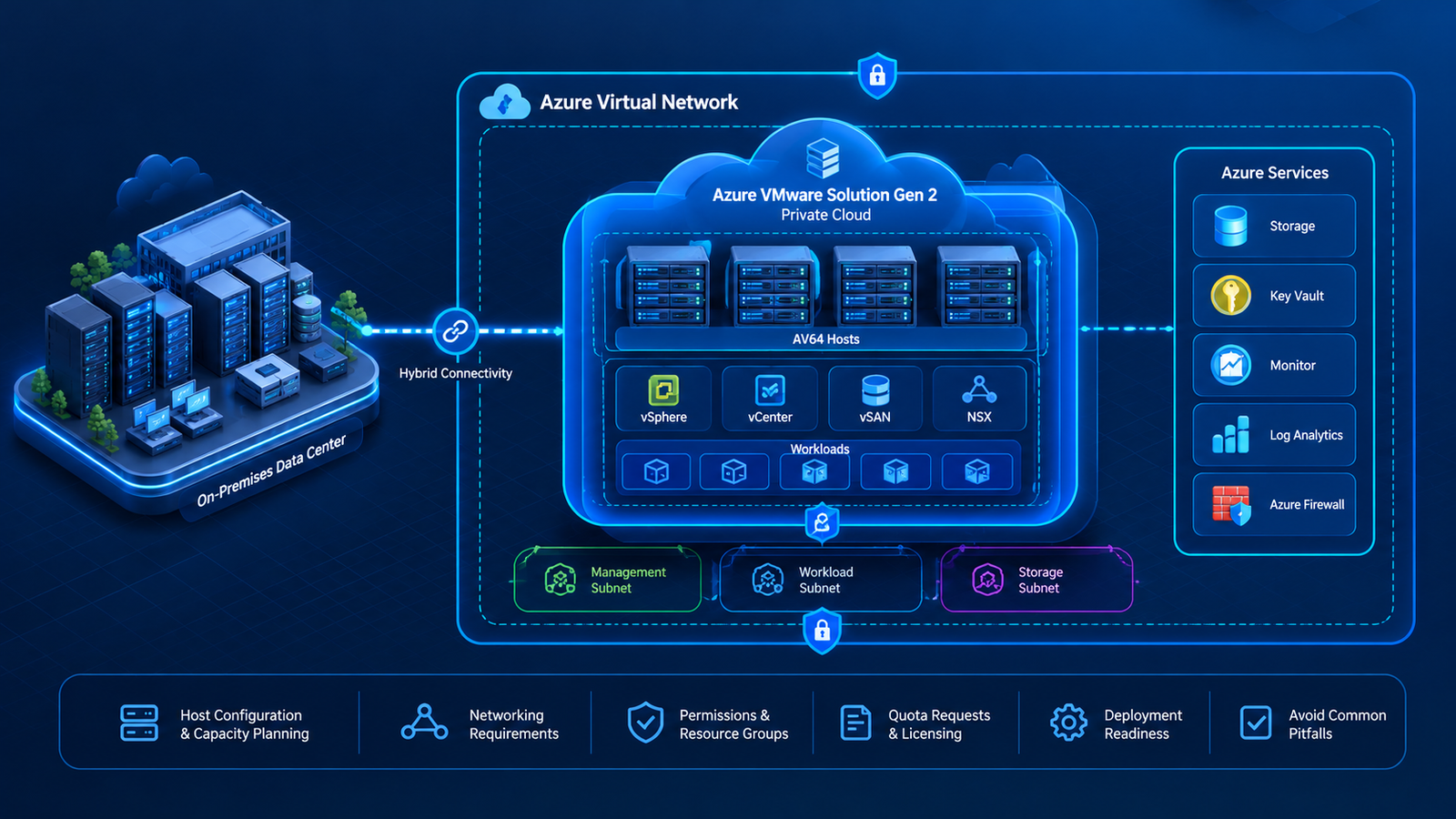
AVS is a managed service for running VMware workloads in Azure. Its VMware environment includes familiar technologies such as vSphere, vCenter Server, vSAN, and NSX. Microsoft manages the underlying Azure infrastructure and the platform’s supported lifecycle operations, while customers remain responsible for their workload architecture, access policies, application requirements, and operational processes.
AVS Gen 2 introduces direct integration between VMware hosts and an Azure VNet. This provides a different starting point for designing connectivity between VMware workloads and Azure resources.

VMware workload environment
Hosts run the VMware platform and virtual machines, allowing teams to continue using established VMware tools and operational practices.

Azure networking integration
The Gen 2 private cloud is deployed in an Azure VNet, providing the foundation for connectivity to other Azure networks and services.

Hybrid-cloud connectivity
On-premises connectivity, DNS, routing, and security still require an intentional design; direct VNet integration does not configure every hybrid connection automatically.
This architecture can simplify integration with Azure networking and services, but it also makes VNet planning a fundamental part of the deployment process.
Key characteristics include:
- Direct VNet integration: The private cloud connects to an Azure Virtual Network.
- Familiar VMware operations: Core VMware technologies remain available for managing workloads.
- Azure networking integration: Connectivity and routing can be designed using Azure networking capabilities.
- Infrastructure planning requirements: Address space, host capacity, licensing, permissions, and region availability must be reviewed before deployment.
Microsoft’s documentation identifies the AV64 host SKU for Gen 2 deployments. Confirm current regional availability and service requirements before planning a production environment.
AVS Gen 2 vs. Classic AVS: Understanding the Difference
The primary difference between Gen 1 and Gen 2 is the network architecture. The underlying VMware software components are substantially the same, but their connectivity models and deployment considerations differ.
| Design area | Classic AVS (Gen 1) | AVS Gen 2 |
|---|---|---|
| Connectivity model | Microsoft-managed ExpressRoute connection to Azure VNets | Direct deployment into an Azure VNet |
| Azure network integration | Uses the established AVS connectivity architecture | Uses standard Azure networking for VNet connectivity |
| Host selection | Supported Gen 1 host configurations | AV64 host SKU |
| Network preparation | Private-cloud connectivity and ExpressRoute planning | VNet address space, delegated subnets, routes, and network policies |
| New deployments | May suit existing environments with specific dependencies | A candidate for new deployments where Gen 2 is supported |
Organizations should not assume that an existing Gen 1 private cloud can simply be switched to Gen 2. A generation change can require workload migration, so the decision should be made early and based on technical dependencies, regional availability, and the intended network topology.
How the AVS Gen 2 Architecture Works

At a high level, the VNet provides the Azure networking environment in which the Gen 2 private cloud is deployed. Azure networking then provides the foundation for reaching other connected networks and resources, subject to the relevant routes, security controls, and service configuration.
The main architectural layers are:
- VMware infrastructure: The hosts and VMware platform that run and manage workloads.
- Private-cloud management networks: Networks used by platform management and infrastructure components.
- VMware workload networks: NSX segments that provide network connectivity for virtual machines.
- Azure VNet: The Azure network containing the Gen 2 deployment and its associated network resources.
- Hybrid connectivity: A separately planned path between the Azure environment and on-premises networks.
- Security and routing: Azure NSGs, route tables, firewalls, and VMware network controls, used according to the applicable design.
The distinction between Azure networking and VMware networking is important. A workload can have an NSX network segment and still depend on Azure routing and subnet configuration to communicate with resources outside the private cloud.
Host Configuration and Capacity Planning
AVS Gen 2 uses the AV64 host SKU. Host sizing should account for the workloads that will run on the platform, the expected migration schedule, storage requirements, and operational headroom.

Before selecting a host count, build an inventory of the existing VMware environment. Record the CPU and memory consumed by each workload, its storage footprint, performance requirements, and dependencies on other systems.
Consider these factors:
- Compute demand: Assess current CPU and memory consumption rather than sizing only from virtual-machine totals.
- Storage demand: Estimate used capacity, future growth, and workload performance requirements.
- Availability: Determine how the environment should respond to host failures and maintenance.
- Migration waves: Identify which workloads must move first and which can follow later.
- Growth: Include planned application changes and expected demand after migration.
A three-host configuration and a four-host configuration should not be treated as interchangeable simply because both might run a particular set of virtual machines. The required host count and supported configuration must be validated against current AVS guidance and the intended resilience model.
Host Quota and Regional Availability
AVS capacity is not guaranteed simply because an Azure subscription exists. The required host SKU must be supported in the target region, and sufficient quota must be allocated to the subscription.

Before deployment:
- Select the intended Azure region.
- Confirm that AVS Gen 2 is supported there.
- Estimate the number of AV64 hosts required.
- Check the available subscription quota.
- Submit the relevant quota request early if additional capacity is needed.
Quota and physical capacity are related but distinct considerations: quota approval does not necessarily mean every requested host is immediately available. Validate the current deployment requirements and timing with Microsoft.
Network Address Planning and Subnet Requirements
Network planning is one of the most important parts of AVS Gen 2 readiness. Microsoft specifies a minimum /22 IPv4 address block for the private-cloud VNet configuration. This range must not overlap with existing on-premises networks or other connected VNets.

A /22 contains 1,024 total IPv4 addresses. However, Azure reserves addresses within each subnet, so the total address count is not the same as the number of usable addresses.
For example, an organization might consider 10.40.0.0/22 as a candidate address block, provided that it does not conflict with any existing network. The actual subnet design must follow the current AVS Gen 2 requirements; the example is not a prescribed production configuration.
The address-planning review should include:
- Existing on-premises IP ranges.
- Connected and peered Azure VNets.
- Address ranges reserved for future workloads.
- Required management and infrastructure subnets.
- HCX management and uplink subnet requirements, if HCX will be used.
- Any reserved address ranges that must not be allocated to customer workloads.
Microsoft’s current guidance also describes two additional /24 subnets for HCX management and uplink in applicable Gen 2 deployments. Validate these requirements against the current documentation and the intended HCX design before allocating the address space.
Routing, NSGs, and Security Considerations
Direct VNet integration does not remove the need for deliberate network security and route planning.
AVS Gen 2 creates delegated subnets and applies network controls to support private-cloud operations. Customers can manage applicable NSGs, while additional system-managed NSGs protect certain critical management interfaces. Internet access is disabled by default unless explicitly enabled through the supported configuration.

Before deployment, review these areas:
- Network Security Groups: Check existing NSG policies and Azure Policy restrictions that could prevent required AVS network resources from being created.
- User-defined routes: Determine how traffic should reach Azure Firewall, a network virtual appliance, or connected networks.
- NSX segments: Plan the workload networks and understand how their routes are advertised into Azure.
- DNS: Define how VMware workloads resolve names for on-premises and Azure resources.
- Internet access: Decide whether internet connectivity is required and how it will be inspected and controlled.
Route scale also deserves attention in larger deployments. Microsoft documents a 1,000-prefix limit for the relevant Gen 2 VNet route architecture. Many small prefixes can consume route capacity faster than a few aggregated ranges, so calculate the expected route footprint before creating a large number of NSX segments or host routes.
Azure Permissions and Resource Group Planning
Deployment readiness also depends on the Azure resource structure and permissions.
Microsoft’s Gen 2 creation guidance requires at least Owner or User Access Administrator permissions at the subscription level for the documented workflow. The required resource providers must be registered, and the private cloud and its VNet must be in the same resource group.
An important design limitation is that the private cloud cannot be moved to another resource group or tenant after creation. Microsoft also documents a limit of one Gen 2 private cloud per VNet and one per resource group under the current design considerations. Confirm these constraints before provisioning because they can influence how environments are separated.
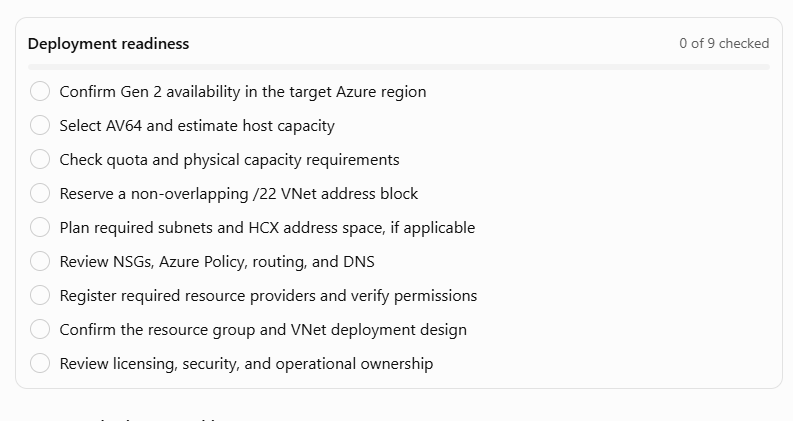
Pre-Deployment Readiness Checklist
Common Mistakes to Avoid
Starting without checking quota: Capacity delays can hold up the deployment even when the design is otherwise ready.
Choosing overlapping IP ranges: Conflicts can cause routing and connectivity problems as networks are connected.
Ignoring Azure Policy: Existing policies that enforce strict NSG or route-table rules can interfere with AVS resource creation. Review the current Gen 2 guidance before deployment.
Assuming all connectivity is automatic: Local VNet connectivity is established during deployment, but connections to other VNets, on-premises networks, and the internet still require the appropriate design and configuration.
Overlooking route scale: Excessive individual prefixes can exhaust route limits. Plan route aggregation and segment design early.
Final Thoughts
AVS Gen 2 provides a different foundation for VMware workloads on Azure by deploying the private cloud directly into an Azure Virtual Network. That architecture can simplify the integration of Azure resources, but successful implementation still depends on careful planning.
The most important preparation steps are to validate regional availability and AV64 capacity, request the required quota, reserve a non-overlapping address space, understand routing and security requirements, and confirm Azure permissions and resource placement.
With these decisions made before provisioning, teams can reduce avoidable deployment issues and establish a stronger foundation for the next stages: private-cloud deployment, post-deployment configuration, and hybrid connectivity.